Annotated List of Command-line Options
- • -adaptive-blur
- • -adaptive-resize
- • -adaptive-sharpen
- • -adjoin
- • -affine
- • -alpha
- • -annotate
- • -antialias
- • -append
- • -attenuate
- • -authenticate
- • -auto-gamma
- • -auto-level
- • -auto-orient
- • -auto-threshold
- • -backdrop
- • -background
- • -bench
- • -bias
- • -bilateral-blur
- • -black-point-compensation
- • -black-threshold
- • -blend
- • -blue-primary
- • -blue-shift
- • -blur
- • -border
- • -bordercolor
- • -borderwidth
- • -brightness-contrast
- • -cache
- • -canny
- • -caption
- • -cdl
- • -channel
- • -charcoal
- • -channel-fx
- • -chop
- • -clahe
- • -clamp
- • -clip
- • -clip-mask
- • -clip-path
- • -clone
- • -clut
- • -coalesce
- • -colorize
- • -colormap
- • -color-matrix
- • -colors
- • -colorspace
- • -color-threshold
- • -combine
- • -comment
- • -compare
- • -complex
- • -compose
- • -composite
- • -compress
- • -connected-components
- • -contrast
- • -contrast-stretch
- • -convolve
- • -copy
- • -crop
- • -cycle
- • -debug
- • -decipher
- • -deconstruct
- • -define
- • -delay
- • -delete
- • -density
- • -depth
- • -descend
- • -deskew
- • -despeckle
- • -direction
- • -displace
- • -display
- • -dispose
- • -dissimilarity-threshold
- • -dissolve
- • -distort
- • -distribute-cache
- • -dither
- • -draw
- • -duplicate
- • -edge
- • -emboss
- • -encipher
- • -encoding
- • -endian
- • -enhance
- • -equalize
- • -evaluate
- • -evaluate-sequence
- • -extent
- • -extract
- • -family
- • -features
- • -fft
- • -fill
- • -filter
- • -flatten
- • -flip
- • -floodfill
- • -flop
- • -font
- • -foreground
- • -format
- • -format[identify]
- • -frame
- • -frame[import]
- • -function
- • -fuzz
- • -fx
- • -gamma
- • -gaussian-blur
- • -geometry
- • -gravity
- • -grayscale
- • -green-primary
- • -hald-clut
- • -help
- • -highlight-color
- • -hough-lines
- • -iconGeometry
- • -iconic
- • -identify
- • -ift
- • -immutable
- • -implode
- • -insert
- • -intensity
- • -intent
- • -interlace
- • -interline-spacing
- • -interpolate
- • -interpolative-resize
- • -interword-spacing
- • -kerning
- • -kmeans
- • -kuwahara
- • -label
- • -lat
- • -layers
- • -level
- • -level-colors
- • -limit
- • -linear-stretch
- • -linewidth
- • -liquid-rescale
- • -list
- • -log
- • -loop
- • -lowlight-color
- • -magnify
- • -map
- • -map[stream]
- • -mattecolor
- • -median
- • -mean-shift
- • -metric
- • -mode
- • -modulate
- • -moments
- • -monitor
- • -monochrome
- • -morph
- • -morphology
- • -mosaic
- • -motion-blur
- • -name
- • -negate
- • -noise
- • -normalize
- • -opaque
- • -ordered-dither
- • -orient
- • -page
- • -paint
- • -path
- • -pause[animate]
- • -pause[import]
- • -perceptible
- • -ping
- • -pointsize
- • -polaroid
- • -poly
- • -posterize
- • -precision
- • -preview
- • -process
- • -profile
- • -quality
- • -quantize
- • -quiet
- • -radial-blur
- • -raise
- • -random-threshold
- • -range-threshold
- • -read-mask
- • -red-primary
- • -regard-warnings
- • -region
- • -remap
- • -remote
- • -render
- • -repage
- • -resample
- • -resize
- • -respect-parentheses
- • -reverse
- • -roll
- • -rotate
- • -sample
- • -sampling-factor
- • -scale
- • -scene
- • -screen
- • -seed
- • -segment
- • -selective-blur
- • -separate
- • -sepia-tone
- • -set
- • -shade
- • -shadow
- • -shared-memory
- • -sharpen
- • -shave
- • -shear
- • -sigmoidal-contrast
- • -silent
- • -similarity-threshold
- • -size
- • -sketch
- • -smush
- • -snaps
- • -solarize
- • -sparse-color
- • -splice
- • -spread
- • -statistic
- • -stegano
- • -stereo
- • -storage-type
- • -stretch
- • -strip
- • -stroke
- • -strokewidth
- • -style
- • -subimage-search
- • -swap
- • -swirl
- • -synchronize
- • -taint
- • -text-font
- • -texture
- • -threshold
- • -thumbnail
- • -tile
- • -tile-offset
- • -tint
- • -title
- • -transform
- • -transparent
- • -transparent-color
- • -transpose
- • -transverse
- • -treedepth
- • -trim
- • -type
- • -undercolor
- • -unique-colors
- • -units
- • -unsharp
- • -update
- • -verbose
- • -version
- • -view
- • -vignette
- • -virtual-pixel
- • -visual
- • -watermark
- • -wave
- • -wavelet-denoise
- • -weight
- • -white-balance
- • -white-point
- • -white-threshold
- • -window
- • -window-group
- • -write
- • -write-mask
Below is list of command-line options recognized by the ImageMagick command-line tools. If you want a description of a particular option, click on the option name in the navigation bar above and you will go right to it. Unless otherwise noted, each option is recognized by the commands: convert and mogrify.
Adaptively blur pixels, with decreasing effect near edges.
A Gaussian operator of the given radius and standard deviation (sigma) is used. If sigma is not given it defaults to 1.
The sigma value is the important argument, and determines the actual amount of blurring that will take place.
The radius is only used to determine the size of the array which will hold the calculated Gaussian distribution. It should be an integer. If not given, or set to zero, IM will calculate the largest possible radius that will provide meaningful results for the Gaussian distribution.
Resize the image using data-dependent triangulation.
See Image Geometry for complete details about the geometry argument. The -adaptive-resize option defaults to data-dependent triangulation. Use the -filter to choose a different resampling algorithm. Offsets, if present in the geometry string, are ignored, and the -gravity option has no effect.
Adaptively sharpen pixels, with increasing effect near edges.
A Gaussian operator of the given radius and standard deviation (sigma) is used. If sigma is not given it defaults to 1.
The sigma value is the important argument, and determines the actual amount of sharpening that will take place.
The radius is only used to determine the size of the array which will hold the calculated Gaussian distribution. It should be an integer. If not given, or set to zero, IM will calculate the largest possible radius that will provide meaningful results for the Gaussian distribution.
Join images into a single multi-image file.
This option is enabled by default. An attempt is made to save all images of an image sequence into the given output file. However, some formats, such as JPEG and PNG, do not support more than one image per file, and in that case ImageMagick is forced to write each image as a separate file. As such, if more than one image needs to be written, the filename given is modified by adding a -scene number before the suffix, in order to make distinct names for each image.
Use +adjoin to force each image to be written to separate files, whether or not the file format allows multiple images per file (for example, GIF, MIFF, and TIFF).
Including a C-style integer format string in the output filename will
automagically enable +adjoin and are used to specify
where the -scene number is placed in the filenames. These
strings, such as '%d' or '%03d', are familiar to those
who have used the standard printf()' C-library function. As an
example, the command
convert logo: rose: -morph 15 my%02dmorph.jpg
will create a sequence of 17 images (the two given plus 15 more created by -morph), named: my00morph.jpg, my01morph.jpg, my02morph.jpg, ..., my16morph.jpg.
In summary, ImageMagick tries to write all images to one file, but will save to multiple files, if any of the following conditions exist...
- the output image's file format does not allow multi-image files,
- the +adjoin option is given, or
- a printf() integer format string (eg: "%d") is present in the output filename.
Set the drawing transformation matrix for combined rotating and scaling.
This option sets a transformation matrix, for use by subsequent -draw or -transform options.
The matrix entries are entered as comma-separated numeric values either in quotes or without spaces.
Internally, the transformation matrix has 3x3 elements, but three of them are omitted from the input because they are constant. The new (transformed) coordinates (x', y') of a pixel at position (x, y) in the original image are calculated using the following matrix equation.
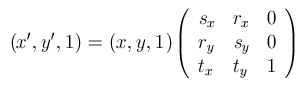
The size of the resulting image is that of the smallest rectangle that contains the transformed source image. The parameters tx and ty subsequently shift the image pixels so that those that are moved out of the image area are cut off.
The transformation matrix complies with the left-handed pixel coordinate system: positive x and y directions are rightward and downward, resp.; positive rotation is clockwise.
If the translation coefficients tx and ty are omitted they default to 0,0. Therefore, four parameters suffice for rotation and scaling without translation.
Scaling by the factors sx and sy in the x and y directions, respectively, is accomplished with the following.
See -transform, and the -distort method Affineprojection for more
information
-affine sx,0,0,sy
Translation by a displacement (tx, ty) is accomplished like so:
-affine 1,0,0,1,tx,ty
Rotate clockwise about the origin (the upper left-hand corner) by an angle a by letting c = cos(a), s = sin(a), and using the following.
-affine c,s,-s,c
The cumulative effect of a sequence of -affine transformations can be accomplished by instead by a single -affine operation using the matrix equal to the product of the matrices of the individual transformations.
An attempt is made to detect near-singular transformation matrices. If the matrix determinant has a sufficiently small absolute value it is rejected.
Gives control of the alpha/matte channel of an image.
Used to set a flag on an image indicating whether or not to use existing alpha channel data, to create an alpha channel, or to perform other operations on the alpha channel. Choose the argument type from the list below.
Note that while the obsolete +matte operation was the
same as "-alpha Off", the
>-matte operation was the same as "-alpha
Set" and not "-alpha On".
-annotate degrees text
-annotate XdegreesxYdegrees text
-annotate XdegreesxYdegrees{+-}tx{+-}ty text
-annotate {+-}tx{+-}ty text
Annotate an image with text
This is a convenience for annotating an image with text. For more precise control over text annotations, use -draw.
The values Xdegrees and Ydegrees control the shears applied to the text, while tx and ty are offsets that give the location of the text relative any -gravity setting and defaults to the upper left corner of the image.
Using -annotate degrees or -annotate degreesxdegrees produces an unsheared rotation of the text. The direction of the rotation is positive, which means a clockwise rotation if degrees is positive. (This conforms to the usual mathematical convention once it is realized that the positive y–direction is conventionally considered to be downward for images.)
The new (transformed) coordinates (x', y') of a pixel at position (x, y) in the image are calculated using the following matrix equation.

If tx and ty are omitted, they default to 0. This makes the bottom-left of the text becomes the upper-left corner of the image, which is probably undesirable. Adding a -gravity option in this case leads to nice results.
Text is any UTF-8 encoded character sequence. If text
is of the form '@mytext.txt', the text is read from the file
mytext.txt. Text in a file is taken literally; no embedded
formatting characters are recognized.
Enable/Disable of the rendering of anti-aliasing pixels when drawing fonts and lines.
By default, objects (e.g. text, lines, polygons, etc.) are antialiased when drawn. Use +antialias to disable the addition of antialiasing edge pixels. This will then reduce the number of colors added to an image to just the colors being directly drawn. That is, no mixed colors are added when drawing such objects.
Join current images vertically or horizontally.
This option creates a single longer image, by joining all the current images in sequence top-to-bottom. Use +append to stack images left-to-right.
If they are not of the same width, narrower images are padded with the current -background color setting, and their position relative to each other can be controlled by the current -gravity setting.
For more flexible options, including the abiity to add space between images, use -smush.
Lessen (or intensify) when adding noise to an image.
If unset the value is equivalent to 1.0, or a maximum noise addition
Decrypt a PDF with a password.
Use this option to supply a password for decrypting a PDF that has been encrypted using Microsoft Crypto API (MSC API). The encrypting using the MSC API is not supported.
For a different encryption method, see -encipher and -decipher.
Automagically adjust gamma level of image.
This calculates the mean values of an image, then applies a calculated -gamma adjustment so that the mean color in the image will get a value of 50%.
This means that any solid 'gray' image becomes 50% gray.
This works well for real-life images with little or no extreme dark and light areas, but tend to fail for images with large amounts of bright sky or dark shadows. It also does not work well for diagrams or cartoon like images.
It uses the -channel setting, (including the 'sync' flag for channel synchronization), to determine which color values is used and modified. As the default -channel setting is 'RGB,sync', channels are modified together by the same gamma value, preserving colors.
Automagically adjust color levels of image.
This is a 'perfect' image normalization operator. It finds the exact minimum and maximum color values in the image and then applies a -level operator to stretch the values to the full range of values.
The operator is not typically used for real-life images, image scans, or JPEG format images, as a single 'out-rider' pixel can set a bad min/max values for the -level operation. On the other hand it is the right operator to use for color stretching gradient images being used to generate Color lookup tables, distortion maps, or other 'mathematically' defined images.
The operator is very similar to the -normalize, -contrast-stretch, and -linear-stretch operators, but without 'histogram binning' or 'clipping' problems that these operators may have. That is -auto-level is the perfect or ideal version these operators.
It uses the -channel setting, (including the special 'sync' flag for channel synchronization), to determine which color values are used and modified. As the default +channel setting is 'RGB,sync', the 'sync' ensures that the color channels will are modified together by the same gamma value, preserving colors, and ignoring transparency.
Adjusts an image so that its orientation is suitable for viewing (i.e. top-left orientation).
This operator reads and resets the EXIF image profile setting 'Orientation' and then performs the appropriate 90 degree rotation on the image to orient the image, for correct viewing.
This EXIF profile setting is usually set using a gravity sensor in digital camera, however photos taken directly downward or upward may not have an appropriate value. Also images that have been orientation 'corrected' without reseting this setting, may be 'corrected' again resulting in a incorrect result. If the EXIF profile was previously stripped, the -auto-orient operator will do nothing.
Automatically perform image thresholding.
Here are the valid methods:
The computed threshold is returned as the auto-threshold:verbose image property. To instead print to your device, use -define auto-threshold:verbose=true.
Average a set of images.
An error results if the images are not identically sized.
Display the image centered on a backdrop.
This backdrop covers the entire workstation screen and is useful for hiding other X window activity while viewing the image. The color of the backdrop is specified as the background color. The color is specified using the format described under the -fill option.
Set the background color.
The color is specified using the format described under the -fill option. The default background color (if none is specified or found in the image) is white.
Measure performance.
Repeat the entire command for the given number of iterations and report the user-time and elapsed time. For instance, consider the following command and its output. Modify the benchmark with the -duration to run the benchmark for a fixed number of seconds and -concurrent to run the benchmark in parallel (requires the OpenMP feature).
$ convert logo: -resize 200% -bench 5 logo.png Performance[1]: 5i 1.344ips 1.000e 3.710u 0:03.720 Performance[2]: 5i 1.634ips 0.549e 3.890u 0:03.060 Performance[3]: 5i 2.174ips 0.618e 3.190u 0:02.300 Performance[4]: 5i 1.678ips 0.555e 3.810u 0:02.980 Performance[4]: 5i 0.875657ips 6.880u 0:05.710
In this example, 5 iterations were completed at 2.174 iterations per second, using 3 threads and 3.190 seconds of the user allotted time, for a total elapsed time of 2.300 seconds.
Add bias when convolving an image.
This option shifts the output of -convolve so that positive and negative results are relative to the specified bias value.
This is important for non-HDRI compilations of ImageMagick when dealing with convolutions that contain negative as well as positive values. This is especially the case with convolutions involving high pass filters or edge detection. Without an output bias, the negative values are clipped at zero.
When using an ImageMagick with the HDRI compile-time setting, -bias is not needed, as ImageMagick is able to store/handle any negative results without clipping to the color value range (0..QuantumRange).
See the discussion on HDRI implementations of ImageMagick on the page High Dynamic-Range Images. For more about HDRI go the ImageMagick Usage pages or this Wikipedia entry.
A non-linear, edge-preserving, and noise-reducing smoothing filter for images. It replaces the intensity of each pixel with a weighted average of intensity values from nearby pixels. This weight is based on a Gaussian distribution. The weights depend not only on Euclidean distance of pixels, but also on the radiometric differences (e.g., range differences, such as color intensity, depth distance, etc.). This preserves sharp edges.
The intensity sigma is in the intensity space. A larger value means that farther colors within the pixel neighborhood (see spatial-sigma) will be mixed together, resulting in larger areas of semi-equal color.
The spatial sigma is in the coordinate space. A larger value means that farther pixels influence each other as long as their colors are close enough (see intensity-sigma ). When the neigborhood diameter is greater than zero, it specifies the neighborhood size regardless of spatial-sigma. Otherwise, the neigborhood diameter is proportional to spatial-sigma.
The default value for the intensity and spatial sigmas are 0.75*diameter and 0.25*diameter respectively.
Use black point compensation.
Force to black all pixels below the threshold while leaving all pixels at or above the threshold unchanged.
The threshold value can be given as a percentage or as an absolute integer value within [0, QuantumRange] corresponding to the desired -channel value. See -threshold for more details on thresholds and resulting values.
Blend an image into another by the given absolute value or percent.
Blend will average the images together ('plus') according to the
percentages given and each pixels transparency. If only a single percentage
value is given it sets the weight of the composite or 'source' image, while
the background image is weighted by the exact opposite amount. That is a
-blend 30% merges 30% of the 'source' image with 70% of the
'destination' image. Thus it is equivalent to -blend 30x70%.
Set the blue chromaticity primary point.
Simulate a scene at nighttime in the moonlight. Start with a factor of 1.5
Reduce image noise and reduce detail levels.
Convolve the image with a Gaussian or normal distribution using the given Sigma value. The formula is:

The sigma value is the important argument, and determines the actual amount of blurring that will take place.
The radius is only used to determine the size of the array which will hold the calculated Gaussian distribution. It should be an integer. If not given, or set to zero, IM will calculate the largest possible radius that will provide meaningful results for the Gaussian distribution.
The larger the Radius the slower the operation is. However too small a Radius, and severe aliasing effects may result. As a guideline, Radius should be at least twice the Sigma value, though three times will produce a more accurate result.
This option differs from -gaussian-blur simply by taking advantage of the separability properties of the distribution. Here we apply a single-dimensional Gaussian matrix in the horizontal direction, then repeat the process in the vertical direction.
The -virtual-pixel setting will determine how pixels which are outside the image proper are blurred into the final result.
Surround the image with a border of color.
Set the width and height using the size portion of the geometry argument. See Image Geometry for complete details about the geometry argument. Offsets are ignored.
As of IM 6.7.8-8, the geometry arguments behave as follows:
Set the border color by preceding with the -bordercolor setting.
The -border operation is affected by the current -compose setting and assumes that this is using the default
'Over' composition method. It generates an image of the appropriate
size colors by the current -bordercolor before
overlaying the original image in the center of this net image. This means that
with the default compose method of 'Over' any transparent parts may
be replaced by the current -bordercolor setting.
See also the -frame option, which has more functionality.
Set the border color.
The color is specified using the format described under the -fill option.
The default border color is #DFDFDF, this shade of gray.
Set the border width.
Adjust the brightness and/or contrast of the image.
Brightness and Contrast values apply changes to the input image. They are not absolute settings. A brightness or contrast value of zero means no change. The range of values is -100 to +100 on each. Positive values increase the brightness or contrast and negative values decrease the brightness or contrast. To control only contrast, set the brightness=0. To control only brightness, set contrast=0 or just leave it off.
You may also use -channel to control which channels to apply the brightness and/or contrast change. The default is to apply the same transformation to all channels.
Brightness and Contrast arguments are converted to offset and slope of a linear transform and applied using -function polynomial "slope,offset".
The slope varies from 0 at contrast=-100 to almost vertical at contrast=+100. For brightness=0 and contrast=-100, the result are totally midgray. For brightness=0 and contrast=+100, the result will approach but not quite reach a threshold at midgray; that is the linear transformation is a very steep vertical line at mid gray.
Negative slopes, i.e. negating the image, are not possible with this function. All achievable slopes are zero or positive.
The offset varies from -0.5 at brightness=-100 to 0 at brightness=0 to +0.5 at brightness=+100. Thus, when contrast=0 and brightness=100, the result is totally white. Similarly, when contrast=0 and brightness=-100, the result is totally black.
As the range of values for the arguments are -100 to +100, adding the '%' symbol is no different than leaving it off.
(This option has been replaced by the -limit option).
Canny edge detector uses a multi-stage algorithm to detect a wide range of edges in the image.
The thresholds range from 0 to 100% (e.g. -canny 0x1+10%+30%) with {+lower-percent} < {+upper-percent}. If {+upper-percent} is increased but {+lower-percent} remains the same, lesser edge components will be detected, but their lengths will be the same. If {+lower-percent} is increased but {+upper-percent} is the same, the same number of edge components will be detected but their lengths will be shorter. The default thresholds are shown.
The radius{xsigma} controls a gaussian blur applied to the input image to reduce noise and smooth the edges.
The sigma value is the important argument, and determines the actual amount of blurring that will take place.
The radius is only used to determine the size of the array which holds the calculated Gaussian distribution. It should be an integer. If not given, or set to zero, IM will calculate the largest possible radius that will provide meaningful results for the Gaussian distribution.
Assign a caption to an image.
This option sets the caption meta-data of an image read in after this
option has been given. To modify a caption of images already in memory use
"-set caption".
The caption can contain special format characters listed in the Format and Print Image Properties. These attributes are expanded when the caption is finally assigned to the individual images.
If the first character of string is @, the image caption is read from a file titled by the remaining characters in the string. Comments read in from a file are literal; no embedded formatting characters are recognized.
Caption meta-data is not visible on the image itself. To do that use the -annotate or -draw options instead.
For example,
-caption "%m:%f %wx%h" bird.miff
produces an image caption of MIFF:bird.miff 512x480 (assuming
that the image bird.miff has a width of 512 and a height of
480.
Color correct with a color decision list.
Here is an example color correction collection:
<?xml version="1.0" encoding="UTF-8"?>
<ColorCorrectionCollection xmlns="urn:ASC:CDL:v1.2">
  <ColorCorrection id="cc06668">
    <SOPNode>
      <Slope> 0.9 1.2 0.5 </Slope>
      <Offset> 0.4 -0.5 0.6 </Offset>
      <Power> 1.0 0.8 1.5 </Power>
    </SOPNode>
    <SATNode>
      <Saturation> 0.85 </Saturation>
    </SATNode>
  </ColorCorrection>
</ColorCorrectionCollection>
Specify those image color channels to which subsequent operators are limited.
Choose from: Red, Green, Blue,
Alpha, Gray, Cyan, Magenta,
Yellow, Black, Opacity,
Index, RGB, RGBA, CMYK, or
CMYKA.
The channels above can also be specified as a comma-separated list or can be
abbreviated as a concatenation of the letters 'R', 'G',
'B', 'A', 'O', 'C',
'M', 'Y', 'K'.
The numerals 0 to 31 may also be used to specify channels, where 0 to 5 are:
-
'
0' equals Red or Cyan '
1' equals Green or Magenta '
2' equals Blue or Yellow '
3' equals Black '
4' equals Alpha or Opacity '
5' equals Index
For example, to only select the Red and Blue channels
you can use any of the following:
-channel Red,Blue
-channel R,B
-channel RB
-channel 0,2
All the channels that are present in an image can be specified using the
special channel type All. Not all operators are 'channel capable',
but generally any operators that are generally 'grey-scale' image operators,
will understand this setting. See individual operator documentation.
On top of the normal channel selection an extra flag can be specified,
'Sync'. This is turned on by default and if set means that
operators that understand this flag should perform: cross-channel
synchronization of the channels. If not specified, then most grey-scale
operators will apply their image processing operations to each individual
channel (as specified by the rest of the -channel
setting) completely independently from each other.
For example for operators such as -auto-level and -auto-gamma the color channels are modified together in exactly the same way so that colors will remain in-sync. Without it being set, then each channel is modified separately and independently, which may produce color distortion.
The -morphology 'Convolve' method
and the -compose mathematical methods, also understands
the 'Sync' flag to modify the behavior of pixel colors according
to the alpha channel (if present). That is to say it will modify the image
processing with the understanding that fully-transparent colors should not
contribute to the final result.
Basically, by default, operators work with color channels in synchronous, and
treats transparency as special, unless the -channel
setting is modified so as to remove the effect of the 'Sync' flag.
How each operator does this depends on that operators current implementation.
Not all operators understands this flag at this time, but that is changing.
To print a complete list of channel types, use -list channel.
By default, ImageMagick sets -channel to the value
'RGBK,sync', which specifies that operators act on all color
channels except the transparency channel, and that all the color channels are
to be modified in exactly the same way, with an understanding of transparency
(depending on the operation being applied). The 'plus' form +channel will reset the value back to this default.
Options that are affected by the -channel setting include the following. -auto-gamma, -auto-level, -black-threshold, -blur, -clamp, -clut, -combine, -composite (Mathematical compose methods only), -convolve, -contrast-stretch, -evaluate, -function, -fx, -gaussian-blur, -hald-clut, -motion-blur, -morphology, -negate, -normalize, -ordered-dither, -radial-blur, -random-threshold, -range-threshold, -separate, -threshold, and -white-threshold.
Warning, some operators behave differently when the +channel default setting is in effect, versus ANY user defined -channel setting (including the equivalent of the default). These operators have yet to be made to understand the newer 'Sync' flag.
For example -threshold will by default grayscale the image before thresholding, if no -channel setting has been defined. This is not 'Sync flag controlled, yet.
Also some operators such as -blur, -gaussian-blur, will modify their handling of the
color channels if the 'alpha' channel is also enabled by -channel. Generally this done to ensure that
fully-transparent colors are treated as being fully-transparent, and thus any
underlying 'hidden' color has no effect on the final results. Typically
resulting in 'halo' effects. The newer -morphology
convolution equivalents however does have a understanding of the 'Sync' flag
and will thus handle transparency correctly by default.
As an alpha channel is optional within images, some operators will read the color channels of an image as a greyscale alpha mask, when the image has no alpha channel present, and the -channel setting tells the operator to apply the operation using alpha channels. The -clut operator is a good example of this.
Exchange, extract, or copy one or more image channels.
The expression consists of one or more channels, either mnemonic or numeric (e.g. red or 0, green or 1, etc.), separated by certain operation symbols as follows:
<=>  exchange two channels (e.g. red<=>blue)
=>   copy one channel to another channel (e.g. red=>green)
=    assign a constant value to a channel (e.g. red=50%)
,    write new image with channels in the specified order (e.g. red, green)
;    add a new output image for the next set of channel operations (e.g. red; green; blue)
|    move to the next input image for the source of channel data (e.g. | gray=>alpha)
For example, to create 3 grayscale images from the red, green, and blue channels of an image, use:
-channel-fx "red; green; blue"
A channel without an operation symbol implies separate (i.e, semicolon).
Here we take an sRGB image and a grayscale image and inject the grayscale image into the alpha channel:
convert wizard.png mask.pgm -channel-fx '| gray=>alpha' wizard-alpha.png
Use a similar command to define a read mask:
convert wizard.png mask.pgm -channel-fx '| gray=>read-mask' wizard-mask.png
Add -debug pixel prior to the -channel-fx option to track the channel morphology.
Simulate a charcoal drawing.
Remove pixels from the interior of an image.
See Image Geometry for complete details about the geometry argument. The width and height given in the of the size portion of the geometry argument give the number of columns and rows to remove. The offset portion of the geometry argument is influenced by a -gravity setting, if present.
The -chop option removes entire rows and columns, and moves the remaining corner blocks leftward and upward to close the gaps.
While it can remove internal rows and columns of pixels, it is more typically used with as -gravity setting and zero offsets so as to remove a single edge from an image. Compare this to -shave which removes equal numbers of pixels from opposite sides of the image.
Using -chop effectively undoes the results of a -splice that was given the same geometry and -gravity settings.
Contrast limited adaptive histogram equalization.
The image is divided into tiles of width and height pixels. Append % to define the width and height as percentages of the image's dimensions. The tile size should be larger than the size of features to be preserved and respects the aspect ratio of the image. Add ! to force an exact tile width and height. number-bins is the number of histogram bins per tile (min 2, max 65536). The number of histogram bins should be smaller than the number of pixels in a single tile. clip-limit is the contrast limit for localized changes in contrast. A clip-limit of 2 to 3 is a good starting place (e.g. -clahe 50x50%+128+3). Very large values will let the histogram equalization do whatever it wants to do, that is result in maximal local contrast. The value 1 will result in the original image. Note, if the number of bins and the clip-limit are ommitted, they default to 128 and no clipping respectively.
Set each pixel whose value is below zero to zero and any the pixel whose value is above the quantum range to the quantum range (e.g. 65535) otherwise the pixel value remains unchanged.
Apply the clipping path if one is present.
If a clipping path is present, it is applied to subsequent operations.
For example, in the command
convert cockatoo.tif -clip -negate negated.tif
only the pixels within the clipping path are negated.
The -clip feature requires SVG support. If the SVG delegate library is not present, the option is ignored.
Use +clip to disable clipping for subsequent operations.
Clip the image as defined by this mask.
Use the alpha channel of the current image as a mask. Any areas that is white is not modified by any of the 'image processing operators' that follow, until the mask is removed. Pixels in the black areas of the clip mask are modified per the requirements of the operator.
In some ways this is similar to (though not the same) as defining a rectangular -region, or using the negative of the mask (third) image in a three image -composite, operation.
Use +clip-mask to disable clipping for subsequent operations.
Clip along a named path from the 8BIM profile.
This is identical to -clip except choose a specific clip path in the event the image has more than one path available. ImageMagick supports UTF-8 encoding. If your named path is in a different encoding, use `iconv` to convert the clip path name to that encoding otherwise the path name will not match.
Use +clip-path to disable clipping for subsequent operations.
Make a clone of an image (or images).
Inside parenthesis (where the operator is normally used) it will make a clone of the images from the last 'pushed' image sequence, and adds them to the end of the current image sequence. Outside parenthesis (not recommended) it clones the images from the current image sequence.
Specify the image by its index in the sequence. The first image is index
0. Negative indexes are relative to the end of the sequence; for
example, −1
represents the last image of the sequence. Specify a range of images with a
dash (e.g. 0−4). Separate multiple indexes with commas but no
spaces (e.g. 0,2,5). A value of '0−−1 will
effectively clone all the images.
The +clone will simply make a copy of the last image
in the image sequence, and is thus equivalent to using an argument of
'−1'.
Replace the channel values in the first image using each corresponding channel in the second image as a color lookup table.
The second (LUT) image is ordinarily a gradient image containing the histogram mapping of how each channel should be modified. Typically it is a either a single row or column image of replacement color values. If larger than a single row or column, values are taken from a diagonal line from top-left to bottom-right corners.
The lookup is further controlled by the -interpolate setting, which is especially handy for an
LUT which is not the full length needed by the ImageMagick installed Quality
(Q) level. Good settings for this are 'bilinear' and
'catrom'. Catom can return a useful second-order continuity.
This operator is especially suited to replacing a grayscale image with a specific color gradient from the CLUT image.
Only the channel values defined by the -channel
setting will have their values replaced. In particular, since the default -channel setting is RGB, this means that
transparency (alpha/matte channel) is not affected, unless the -channel setting is modified. When the alpha channel is
set, it is treated by the -clut operator in the same way
as the other channels, implying that alpha/matte values are replaced using the
alpha/matte values of the original image.
If either the image being modified, or the lookup image, contains no transparency (i.e. -alpha is turned 'off') but the -channel setting includes alpha replacement, then it is assumed that image represents a grayscale gradient which is used for the replacement alpha values. That is you can use a grayscale CLUT image to adjust a existing images alpha channel, or you can color a grayscale image using colors form CLUT containing the desired colors, including transparency.
See also -hald-clut which replaces colors according to the lookup of the full color RGB value from a 2D representation of a 3D color cube.
Fully define the look of each frame of an GIF animation sequence, to form a 'film strip' animation.
Overlay each image in an image sequence according to its -dispose meta-data, to reproduce the look of an animation at each point in the animation sequence. All images should be the same size, and are assigned appropriate GIF disposal settings for the animation to continue working as expected as a GIF animation. Such frames are more easily viewed and processed than the highly optimized GIF overlay images.
The animation can be re-optimized after processing using
the -layers method 'optimize', although
there is no guarantee that the restored GIF animation optimization is
better than the original.
Colorize the image by an amount specified by value using the color specified by the most recent -fill setting.
Specify the amount of colorization as a percentage. Separate colorization
values can be applied to the red, green, and blue channels of the image with
a comma-delimited list of colorization
values (e.g., -colorize 0,0,50).
Define the colormap type.
The type can be shared or private.
This option only applies when the default X server visual
is PseudoColor or GrayScale. Refer
to -visual for more details. By default,
a shared colormap is allocated. The image shares colors with
other X clients. Some image colors could be approximated,
therefore your image may look very different than intended.
If private is chosen, the image colors appear exactly
as they are defined. However, other clients may go technicolor
when the image colormap is installed.
Set the preferred number of colors in the image.
The actual number of colors in the image may be less than your request, but never more. Note that this a color reduction option. Images with fewer unique colors than specified by value will have any duplicate or unused colors removed. The ordering of an existing color palette may be altered. When converting an image from color to grayscale, it is more efficient to convert the image to the gray colorspace before reducing the number of colors. Refer to the color reduction algorithm for more details.
Apply color correction to the image.
This option permits saturation changes, hue rotation, luminance to alpha, and various other effects. Although variable-sized transformation matrices can be used, typically one uses a 5x5 matrix for an RGBA image and a 6x6 for CMYKA (or RGBA with offsets). The matrix is similar to that used by Adobe Flashexcept Imagemagick's offsets are in column 6 rather than 5 (in support of CMYKA images) and Imagemagick's offsets are normalized (divide Flash offsets by 255).
As an example, to add contrast to an image with offsets, try this command:
convert kittens.jpg -color-matrix \
  " 1.5 0.0 0.0 0.0, 0.0, -0.157 \
    0.0 1.5 0.0 0.0, 0.0, -0.157 \
    0.0 0.0 1.5 0.0, 0.0, -0.157 \
    0.0 0.0 0.0 1.0, 0.0,  0.0 \
    0.0 0.0 0.0 0.0, 1.0,  0.0 \
    0.0 0.0 0.0 0.0, 0.0,  1.0" kittens.png
Set the image colorspace.
Choices are:
CMY          CMYK         Gray         HCL
HCLp         HSB          HSI          HSL
HSV          HWB          Jzazbz       Lab
LCHab        LCHuv        LMS          Log
Luv          OHTA         Rec601YCbCr  Rec709YCbCr
RGB          scRGB        sRGB         Transparent
xyY          XYZ          YCbCr        YCC
YDbDr        YIQ          YPbPr        YUV
Undefined
To print a complete list of colorspaces, use -list colorspace.
For a more accurate color conversion to or from the linear RGB, CMYK, or grayscale colorspaces, use the -profile option. Note, ImageMagick assumes the sRGB colorspace if the image format does not indicate otherwise. For colorspace conversion, the gamma function is first removed to produce linear RGB.
Note the scRGB colorspace requires HDRI support otherwise it behaves just like linear RGB.
Use the Undefined colorspace to identify multi-spectral images.
Return a binary image where all colors within the specified range are changed to white. All other colors are changed to black.
Combine one or more images into a single image.
The channels (previously set by -channel) of the
combined image are taken from the grayscale values of each image in the
sequence, in order. For the default -channel setting of RGB, this
means the first image is assigned to the Red channel, the second
to the Green channel, the third to the Blue.
This option can be thought of as the inverse to -separate, so long as the channel settings are the same. Thus, in the following example, the final image should be a copy of the original.
convert original.png -channel RGB -separate sepimage.png
convert sepimage-0.png sepimage-1.png sepimage-2.png -channel RGB \
  -combine imagecopy.png
Embed a comment in an image.
This option sets the comment meta-data of an image read in after this
option has been given. To modify a comment of images already in memory use
"-set comment".
The comment can contain special format characters listed in the Format and Print Image Properties. These attributes are expanded when the comment is finally assigned to the individual images.
If the first character of string is @, the image comment is read from a file titled by the remaining characters in the string. Comments read in from a file are literal; no embedded formatting characters are recognized.
Comment meta-data are not visible on the image itself. To do that use the -annotate or -draw options instead.
For example,
-comment "%m:%f %wx%h" bird.miff
produces an image comment of MIFF:bird.miff 512x480 (assuming
that the image bird.miff has a width of 512 and a height of
480.
Mathematically and visually annotate the difference between an image and its reconstruction
This is a convert version of "compare" for two same sized images. The syntax is as follows, but other metrics are allowed.
convert image.png reference.png -metric RMSE -compare \
 difference.png
To get the metric value use the string format "%[distortion]".
convert image.png reference.png -metric RMSE -compare -format \
   "%[distortion]" info:
Perform complex mathematics on an image sequence
Choose from these operators:add
conjugate
divide
magnitude-phase
multiply
real-imaginary
subtract
Optionally specify the divide operator SNR with -define complex:snr=float.
Set the type of image composition.
See Alpha Compositing for a detailed discussion of alpha compositing.
This setting affects image processing operators that merge two (or more) images together in some way. This includes the operators, -compare, -composite, -layers composite, -flatten, -mosaic, -layers merge, -border, -frame, and -extent.
It is also one of the primary options for the "$ composite" command.
Perform alpha composition on two images and an optional mask
Take the first image 'destination' and overlay the second 'source' image according to the current -compose setting. The location of the 'source' or 'overlay' image is controlled according to -gravity, and -geometry settings.
If a third image is given this is treated as a grayscale blending 'mask' image
relative to the first 'destination' image. This mask is blended with the
source image. However for the 'displace' compose method, the
mask is used to provide a separate Y-displacement image instead.
If a -compose method requires extra numerical
arguments or flags these can be provided by setting the -set 'option:compose:args'
appropriately for the compose method.
Some -compose methods can modify the 'destination'
image outside the overlay area. It is disabled by default. You can enable this by setting the define: -define 'compose:clip-to-self=true'.
The SVG compositing specification requires that color and opacity values range between zero and QuantumRange inclusive. You can permit values outside this range with this option: -set 'option:compose:clamp=false
Use pixel compression specified by type when writing the image.
Choices are: None, BZip, Fax, Group4, JPEG, JPEG2000, Lossless, LZW, RLE or Zip.
To print a complete list of compression types, use -list compress.
Specify +compress to store the binary image in an uncompressed format. The default is the compression type of the specified image file.
If LZW compression is specified but LZW compression has not been
enabled, the image data is written in an uncompressed LZW format that can be
read by LZW decoders. This may result in larger-than-expected GIF files.
Lossless refers to lossless JPEG, which is only available if the
JPEG library has been patched to support it. Use of lossless JPEG is generally
not recommended.
When writing an ICO file, you may request that the images be encoded in
PNG format, by specifying Zip compression.
When writing a JNG file, specify Zip compression to request that
the alpha channel be encoded in PNG "IDAT" format, or JPEG
to request that it be encoded in JPG "JDAA" format.
Use the -quality option to set the compression level to be used by JPEG, PNG, MIFF, and MPEG encoders. Use the -sampling-factor option to set the sampling factor to be used by JPEG, MPEG, and YUV encoders for down-sampling the chroma channels.
connected-components labeling detects connected regions in an image, choose from 4 or 8 way connectivity.
Use -define connected-components:verbose=true to output statistics associated with each unique label.
Enhance or reduce the image contrast.
This option enhances the intensity differences between the lighter and darker elements of the image. Use -contrast to enhance the image or +contrast to reduce the image contrast.
For a more pronounced effect you can repeat the option:
convert rose: -contrast -contrast rose_c2.png
Increase the contrast in an image by stretching the range of intensity values.
While performing the stretch, black-out at most black-point pixels and white-out at most white-point pixels. Or, if percent is used, black-out at most black-point % pixels and white-out at most white-point % pixels.
Prior to ImageMagick 6.4.7-0, -contrast-stretch will black-out at most black-point pixels and white-out at most total pixels minus white-point pixels. Or, if percent is used, black-out at most black-point % pixels and white-out at most 100% minus white-point % pixels.
Note that -contrast-stretch 0 will modify the image such that
the image's min and max values are stretched to 0 and QuantumRange, respectively, without any loss of data due to burn-out or
clipping at either end. This is not the same as -normalize, which is equivalent to -contrast-stretch 2%x1% (or
prior to ImageMagick 6.4.7-0, -contrast-stretch 2%x99%).
Internally operator works by creating a histogram bin, and then uses that bin to modify the image. As such some colors may be merged together when they originally fell into the same 'bin'.
All the channels are normalized in concert by the same amount so as to preserve color integrity, when the default +channel setting is in use. Specifying any other -channel setting will normalize the RGB channels independently.
See also -auto-level for a 'perfect' normalization of mathematical images.
This operator is under review for re-development.
Convolve an image with a user-supplied convolution kernel.
The kernel is a matrix specified as a comma-separated list of integers (with no spaces), ordered left-to right, starting with the top row. Presently, only odd-dimensioned kernels are supported, and therefore the number of entries in the specified kernel must be 32=9, 52=25, 72=49, etc.
Note that the -convolve operator supports the -bias setting. This option shifts the convolution so that positive and negative results are relative to a user-specified bias value. This is important for non-HDRI compilations of ImageMagick when dealing with convolutions that contain negative as well as positive values. This is especially the case with convolutions involving high pass filters or edge detection. Without an output bias, the negative values is clipped at zero.
When using an ImageMagick with the HDRI compile-time setting, -bias is not needed, as ImageMagick is able to store/handle any negative results without clipping to the color value range (0..QuantumRange). See the discussion on HDRI implementations of ImageMagick on the page High Dynamic-Range Images. For more about HDRI go the ImageMagick Usage pages or this Wikipedia entry.
Copy pixels from one area of an image to another.
Cut out one or more rectangular regions of the image.
See Image Geometry for complete details about the geometry argument.
The width and height of the geometry argument give the size of the image that remains after cropping, and x and y in the offset (if present) gives the location of the top left corner of the cropped image with respect to the original image. To specify the amount to be removed, use -shave instead.
If the x and y offsets are
present, a single image is generated, consisting of the pixels from the
cropping region. The offsets specify the location of the upper left corner of
the cropping region measured downward and rightward with respect to the upper
left corner of the image. If the -gravity option is
present with NorthEast, East, or SouthEast
gravity, it gives the distance leftward from the right edge of the image to
the right edge of the cropping region. Similarly, if the -gravity option is present with SouthWest,
South, or SouthEast gravity, the distance is measured
upward between the bottom edges.
If the x and y offsets are omitted, a set of tiles of the specified geometry, covering the entire input image, is generated. The rightmost tiles and the bottom tiles are smaller if the specified geometry extends beyond the dimensions of the input image.
You can add the @ to the geometry argument to equally divide the image into the number of tiles generated.
By adding a exclamation character flag to the geometry argument, the cropped images virtual canvas page size and offset is set as if the geometry argument was a viewport or window. This means the canvas page size is set to exactly the same size you specified, the image offset set relative top left corner of the region cropped.
If the cropped image 'missed' the actual image on its virtual canvas, a special single pixel transparent 'missed' image is returned, and a 'crop missed' warning given.
It might be necessary to +repage the image prior to cropping the image to ensure the crop coordinate frame is relocated to the upper-left corner of the visible image. Similarly you may want to use +repage after cropping to remove the page offset that will be left behind. This is especially true when you are going to write to an image format such as PNG that supports an image offset.
Displace image colormap by amount.
Amount defines the number of positions each colormap entry is shifted.
Enable debug printout.
The events parameter specifies which events are to be logged. It
can be either None, All, Trace, or
a comma-separated list consisting of one or more of the following domains:
Accelerate, Annotate, Blob, Cache,
Coder, Configure, Deprecate,
Exception, Locale, Render,
Resource, Security, TemporaryFile,
Transform, X11, or User.
For example, to log cache and blob events, use.
convert -debug "Cache,Blob" rose: rose.png
The User domain is normally empty, but developers can log user
events in their private copy of ImageMagick.
To print the complete list of debug methods, use -list debug.
Use the -log option to specify the format for debugging output.
Use +debug to turn off all logging.
Debugging may also be set using the MAGICK_DEBUG environment variable. The allowed values for the MAGICK_DEBUG
environment variable are the same as for the -debug
option.
Decipher and restore pixels that were previously transformed by -encipher.
Get the passphrase from the file specified by filename.
For more information, see the webpage, ImageMagick: Encipher or Decipher an Image.
Find areas that has changed between images
Given a sequence of images all the same size, such as produced by -coalesce, replace the second and later images, with a smaller image of just the area that changed relative to the previous image.
The resulting sequence of images can be used to optimize an animation sequence, though will not work correctly for GIF animations when parts of the animation can go from opaque to transparent.
This option is actually equivalent to the -layers
method 'compare-any'.
Add specific global settings generally used to control coders and image processing operations.
This option creates one or more definitions for coders and decoders to use
while reading and writing image data. Definitions are generally used to
control image file format coder modules, and image processing operations,
beyond what is provided by normal means. Defined settings are listed in -verbose information ("info:" output format)
as "Artifacts".
If value is missing for a definition, an empty-valued definition of a flag is created with that name. This used to control on/off options. Use +define key to remove definitions previously created. Use +define "*" to remove all existing definitions.
The same 'artifact' settings can also be defined using the -set "option:key" "value" option, which also allows the use of Format and Print Image Properties in the defined value.
The option and key are case-independent (they are converted to lowercase for use within the decoders) while the value is case-dependent.
Such settings are global in scope, and affect all images and operations.
See ImageMagick Defines for a list of recognized defines. For example:
convert bilevel.tif -define ps:imagemask eps3:stencil.ps
Set attributes of the image registry by prefixing the value with
registry:. For example, to set a temporary path to put work files,
use:
-define registry:temporary-path=/data/tmp
Display the next image after pausing.
This option is useful for regulating the animation of image sequences ticks/ticks-per-second seconds must expire before the display of the next image. The default is no delay between each showing of the image sequence. The default ticks-per-second is 100.
Use > to change the image delay only if its current
value exceeds the given delay. < changes the image delay
only if current value is less than the given delay. For example, if
you specify 30> and the image delay is 20, the image delay does
not change. However, if the image delay is 40 or 50, the delay it is changed
to 30. Enclose the given delay in quotation marks to prevent the
< or > from being interpreted by your shell as
a file redirection.
Delete the images specified by index, from the image sequence.
Specify the image by its index in the sequence. The first image is index
0. Negative indexes are relative to the end of the sequence, for example, -1
represents the last image of the sequence. Specify a range of images with
a dash (e.g. 0-4). Separate indexes with a comma (e.g. 0,2). Use
+delete to delete the last image in the current image sequence. Use -delete 0--1 to delete the entire image sequence.
You can also delete images from the persistent registry, e.g., -delete
registry:checkers
Set the horizontal and vertical resolution of an image for rendering to devices.
This option specifies the image resolution to store while encoding a raster image or the canvas resolution while rendering (reading) vector formats such as Postscript, PDF, WMF, and SVG into a raster image. Image resolution provides the unit of measure to apply when rendering to an output device or raster image. The default unit of measure is in dots per inch (DPI). The -units option may be used to select dots per centimeter instead.
The default resolution is 72 dots per inch, which is equivalent to one point per pixel (Macintosh and Postscript standard). Computer screens are normally 72 or 96 dots per inch, while printers typically support 150, 300, 600, or 1200 dots per inch. To determine the resolution of your display, use a ruler to measure the width of your screen in inches, and divide by the number of horizontal pixels (1024 on a 1024x768 display).
If the file format supports it, this option may be used to update the stored image resolution. Note that Photoshop stores and obtains image resolution from a proprietary embedded profile. If this profile is not stripped from the image, then Photoshop will continue to treat the image using its former resolution, ignoring the image resolution specified in the standard file header.
The -density option sets an attribute and does not alter the underlying raster image. It may be used to adjust the rendered size for desktop publishing purposes by adjusting the scale applied to the pixels. To resize the image so that it is the same size at a different resolution, use the -resample option.
Depth of the image.
Color depth is the number of bits per channel for each pixel. For example, for a depth of 16 using RGB, each channel of Red, Green, and Blue can range from 0 to 2^16-1 (65535). Use this option to specify the depth of raw images formats whose depth is unknown such as GRAY, RGB, or CMYK, or to change the depth of any image after it has been read.
Use +depth to return depth to its default value.
Obtain image by descending window hierarchy.
Straighten an image. A threshold of 40% works for most images.
Use -set option:deskew:auto-crop
true | false to auto crop the image.
Reduce the speckles within an image.
Render text right-to-left or left-to-right. Requires the RAQM delegate library and complex text layout.
Shift image pixels as defined by a displacement map.
With this option, the 'overlay' image, and optionally the 'mask' image, is used as a displacement map, which is used to displace the lookup of what part of the 'background' image is seen at each point of the overlaid area. Much like the displacement map is a 'lens' that redirects light shining through it so as to present a distorted view the original 'background' image behind it.
Any perfect grey areas of the displacement map produce a zero displacement of the image. Black areas produce the given maximum negative displacement of the lookup point, while white produce a maximum positive displacement of the lookup.
Note that it is the lookup of the 'background' that is displaced, not a displacement of the image itself. As such an area of the displacement map containing 'white' will have the lookup point 'shifted' by a positive amount, and thus generating a copy of the destination image to the right/downward from the correct position. That is the image will look like it may have been 'shifted' in a negative left/upward direction. Understanding this is a very important in understanding how displacement maps work.
The given arguments define the maximum amount of displacement in pixels that a particular map can produce. If the displacement scale is large enough it is also possible to lookup parts of the 'background' image that lie well outside the bounds of the displacement map itself. That is you could very easily copy a section of the original image from outside the overlay area into the overlay area.
The '%' flag makes the displacement scale relative to the size of the overlay image (100% = half width/height of image). Using '!' switches percentage arguments to refer to the destination image size instead. these flags were added as of IM v6.5.3-5.
Normally a single grayscale displacement map is provided, which with the given scaling values will determine a single direction (vector) in which displacements can occur (positively or negatively). However, if you also specify a third image which is normally used as a mask, the composite image is used for horizontal X displacement, while the mask image is used for vertical Y displacement. This allows you to define completely different displacement values for the X and Y directions, and allowing you to lookup any point within the scale bounds. In other words each pixel can lookup any other nearby pixel, producing complex 2 dimensional displacements, rather than a simple 1 dimensional vector displacements.
Alternatively rather than supplying two separate images, as of IM v6.4.4-0, you can use the 'red' channel of the overlay image to specify the horizontal or X displacement, and the 'green' channel for the vertical or Y displacement.
As of IM v6.5.3-5 any alpha channel in the overlay image is used as a mask the transparency of the destination image. However areas outside the overlaid areas will not be affected.
Specifies the X server to contact.
This option is used with convert for obtaining image or font from this X server. See X(1).
Define the GIF disposal image setting for images that are being created or read in.
The layer disposal method defines the way each the displayed image is to be modified after the current 'frame' of an animation has finished being displayed (after its 'delay' period), but before the next frame on an animation is to be overlaid onto the display.
Here are the valid methods:
You can also use the numbers given above, which is what the GIF format uses internally to represent the above settings.
To print a complete list of dispose methods, use -list dispose.
Use +dispose, turn off the setting and prevent resetting the layer disposal methods of images being read in.
Use -set 'dispose' method to set the image
disposal method for images already in memory.
Maximum RMSE for subimage match (default 0.2).
Dissolve an image into another by the given percent.
The opacity of the composite image is multiplied by the given percent, then
it is composited 'over' the main image. If src_percent
is greater than 100, start dissolving the main image so it becomes
transparent at a value of '200'. If both percentages
are given, each image are dissolved to the percentages given.
Note that dissolve percentages do not add, two opaque images dissolved '50,50', produce a 75% transparency. For a 50% + 50% blending of the two images, you would need to use dissolve values of '50,100'.
Distort an image, using the given method and its required arguments.
The arguments is a single string containing a list of floating point numbers separated by commas or spaces. The number of and meaning of the floating point values depends on the distortion method being used.
Choose from these distortion types:
To print a complete list of distortion methods, use -list distort.
Many of the above distortion methods such as 'Affine',
'Perspective', and 'Shepards' use a list control points
defining how these points in the given image should be distorted in the
destination image. Each set of four floating point values represent a source
image coordinate, followed immediately by the destination image coordinate.
This produces a list of values such as...
U1,V1 X1,Y1 U2,V2 X2,Y2 U3,V3 X3,Y3 ... Un,Vn Xn,Yn
where U,V on the source image is mapped to X,Y on the destination image.
For example, to warp an image using 'perspective' distortion,
needs a list of at least 4 sets of coordinates, or 16 numbers. Here is the
perspective distortion of the built-in "rose:" image. Note how spaces were
used to group the 4 sets of coordinate pairs, to make it easier to read and
understand.
convert rose:  -virtual-pixel black \
  -distort Perspective '0,0,0,0  0,45,0,45  69,0,60,10  69,45,60,35' \
   rose_3d_rotated.gif"
If more that the required number of coordinate pairs are given for
a distortion, the distortion method is 'least squares' fitted to produce the
best result for all the coordinate pairs given. If less than the ideal number
of points are given, the distort will generally fall back to a simpler form of
distortion that can handles the smaller number of coordinates (usually a linear
'Affine' distortion).
By using more coordinates you can make use of image registration tool to find matching coordinate pairs in overlapping images, so as to improve the 'fit' of the distortion. Of course a bad coordinate pair can also make the 'fit' worse. Caution is always advised.
Colors are acquired from the source image according to a cylindrical
resampling -filter, using a special technique known as
EWA resampling. This produces very high quality results, especially when
images become smaller (minified) in the output, which is very common when
using 'perspective' distortion. For example here we view
a infinitely tiled 'plane' all the way to the horizon.
convert -size 90x90 pattern:checkerboard -normalize -virtual-pixel tile \
  -distort perspective  '0,0,5,45  89,0,45,46  0,89,0,89  89,89,89,89' \
   checks_tiled.jpg
Note that a infinitely tiled perspective images involving the horizon can
be very slow, because of the number of pixels that are compressed to generate
each individual pixel close to the 'horizon'. You can turn off EWA
resampling, by specifying the special -filter setting of
'point' (recommended if you plan to use super-sampling instead).
If an image generates invalid pixels, such as the 'sky' in the last example, -distort will use the current -mattecolor setting for these pixels. If you do not what these pixels to be visible, set the color to match the rest of the ground.
The output image size will by default be the same as the input image. This means that if the part of the distorted image falls outside the viewed area of the 'distorted space', those parts is clipped and lost. However if you use the plus form of the operator (+distort) the operator will attempt (if possible) to show the whole of the distorted image, while retaining a correct 'virtual canvas' offset, for image layering. This offset may need to be removed using +repage, to remove if it is unwanted.
Setting -verbose setting, will cause -distort to attempt to output the internal coefficients, and the -fx equivalent to the distortion, for expert study, and debugging purposes. This many not be available for all distorts.
You can alternatively specify a special "-define distort:viewport={geometry_string}" setting which will
specify the size and the offset of the generated 'viewport' image of the
distorted image space.
Setting a "-define
distort:scale=scale_factor" will scale the output image (viewport or
otherwise) by that factor without changing the viewed contents of the
distorted image. This can be used either for 'super-sampling' the image for
a higher quality result, or for panning and zooming around the image (with
appropriate viewport changes, or post-distort cropping and resizing).
Setting "-define resample:verbose=1"
will output the cylindrical filter lookup table created by the EWA (Elliptical
Weighted Average) resampling algorithm. Note this table uses a squared radius
lookup value. This is typically only used for debugging EWA resampling.
Launch a distributed pixel cache server.
Apply a Riemersma or Floyd-Steinberg error diffusion dither to images when general color reduction is applied via an option, or automagically when saving to specific formats. This enabled by default.
Dithering places two or more colors in neighboring pixels so that to the eye a closer approximation of the images original color is reproduced. This reduces the number of colors needed to reproduce the image but at the cost of a lower level pattern of colors. Error diffusion dithers can use any set of colors (generated or user defined) to an image.
Dithering is turned on by default, to turn it off use the plus form of the setting, +dither. This will also render PostScript without text or graphic aliasing. Disabling dithering often (but not always) leads to faster process, a smaller number of colors, but more cartoon like image coloring. Generally resulting in 'color banding' effects in areas with color gradients.
The color reduction operators -colors, -monochrome, -remap, and -posterize, apply dithering to images using the reduced
color set they created. These operators are also used as part of automatic
color reduction when saving images to formats with limited color support, such
as GIF:, XBM:, and others, so dithering may also be used
in these cases.
Alternatively you can use -random-threshold to generate purely random dither. Or use -ordered-dither to apply threshold mapped dither patterns, using uniform color maps, rather than specific color maps.
Use "-define dither:diffusion-amount=35%, for example, to control the amount of Floyd-Steinberg dither.
Annotate an image with one or more graphic primitives.
Use this option to annotate or decorate an image with one or more graphic primitives. The primitives include shapes, text, transformations, and pixel operations.
The shape primitives:
The text primitive:
- text
- x0,y0 string
The text gravity primitive:
- gravity
- NorthWest, North, NorthEast, West, Center, East, SouthWest, South, or SouthEast
The text gravity primitive only affects the placement of text and does not interact with the other primitives. It is equivalent to using the -gravity command-line option, except that it is limited in scope to the -draw option in which it appears.
The transformation primitives:
The pixel operation primitives:
The shape primitives are drawn in the color specified by the preceding -fill setting. For unfilled shapes, use -fill none. You can optionally control the stroke (the "outline" of a shape) with the -stroke and -strokewidth settings.
A point primitive is specified by a single point in the
pixel plane, that is, by an ordered pair of integer coordinates,
x,y. (As it involves only a single pixel, a point
primitive is not affected by -stroke or -strokewidth.)
A line primitive requires a start point and end point.
A rectangle primitive is specified by the pair of points at the
upper left and lower right corners.
A roundRectangle primitive takes the same corner points as
a rectangle followed by the width and height of the rounded corners
to be removed.
The circle primitive makes a disk (filled) or circle (unfilled).
Give the center and any point on the perimeter (boundary). Note, by using a translation, you can remove the need to calculate the circles edge coordinate, but can just give the radius directly:
magick -size 100x60 xc: -stroke SeaGreen -fill PaleGreen -strokewidth 2 -draw 'translate 50,30 circle 0,0 25,0' circle.gifThe arc primitive is used to inscribe an elliptical segment in
to a given rectangle. An arc requires the two corners used for
rectangle (see above) followed by the start and end angles of the
arc of the segment (e.g. 130,30 200,100 45,90). The start and end
points produced are then joined with a line segment and the resulting segment
of an ellipse is filled.
Use ellipse to draw a partial (or whole) ellipse. Give the
center point, the horizontal and vertical "radii" (the semi-axes of
the ellipse) and start and end angles in degrees (e.g. 100,100 100,150
0,360).
The polyline and polygon primitives require three or
more points to define their perimeters. A polyline is simply
a polygon in which the final point is not stroked to the start
point. When unfilled, this is a polygonal line. If the -stroke setting is none (the default), then
a polyline is identical to a polygon.
A coordinate is a pair of integers separated by a space or optional comma.
As an example, to define a circle centered at 100,100 that extends to 150,150 use:
-draw 'circle 100,100 150,150'
The Bezier primitive creates a spline curve and requires three
or points to define its shape. The first and last points are the
knots and these points are attained by the curve, while any
intermediate coordinates are control points. If two control points
are specified, the line between each end knot and its sequentially respective
control point determines the tangent direction of the curve at that end. If
one control point is specified, the lines from the end knots to the one
control point determines the tangent directions of the curve at each end. If
more than two control points are specified, then the additional control points
act in combination to determine the intermediate shape of the curve. In order
to draw complex curves, it is highly recommended either to use the
path primitive or to draw multiple four-point bezier segments with
the start and end knots of each successive segment repeated. For example:
-draw 'bezier 20,50 45,100 45,0 70,50'
-draw 'bezier 70,50 95,100 95,0 120,50'
A path represents an outline of an object, defined in terms of
moveto (set a new current point), lineto (draw a straight line), curveto (draw
a Bezier curve), arc (elliptical or circular arc) and closepath (close the
current shape by drawing a line to the last moveto) elements. Compound paths
(i.e., a path with subpaths, each consisting of a single moveto followed by
one or more line or curve operations) are possible to allow effects such as
donut holes in objects. (See Paths.)
Use image to composite an image with another image. Follow the
image keyword with the composite operator, image location, image size, and
filename:
-draw 'image SrcOver 100,100 225,225 image.jpg'
You can use 0,0 for the image size, which means to use the actual dimensions found in the image header. Otherwise, it is scaled to the given dimensions. See Alpha Compositing for a detailed discussion of alpha composition methods that are available.
The "special augmented compose operators" such as "dissolve" that require
arguments cannot be used at present with the -draw image option.
Use text to annotate an image with text. Follow the text
coordinates with a string. If the string has embedded spaces, enclose it in
single or double quotes.
For example, the following annotates the image with Works like
magick! for an image titled bird.miff.
-draw "text 100,100 'Works like magick!'"
See the -annotate option for another convenient way to annotate an image with text.
The rotate primitive rotates subsequent shape primitives and
text primitives about the origin of the main image.:/p>
-draw "rotate 45 text 10,10 'Works like magick!'"
The translate primitive translates subsequent shape and text
primitives.
The scale primitive scales them.
The skewX and skewY primitives skew them with respect
to the origin of the main image or the region.
The transformations modify the current affine matrix, which is initialized from the initial affine matrix defined by the -affine option. Transformations are cumulative within the -draw option. The initial affine matrix is not affected; that matrix is only changed by the appearance of another -affine option. If another -draw option appears, the current affine matrix is reinitialized from the initial affine matrix.
Use the color primitive to change the color of a pixel to the
fill color (see -fill). Follow the pixel coordinate with
a method:
point
replace
floodfill
filltoborder
reset
Consider the target pixel as that specified by your coordinate. The
point method recolors the target pixel. The replace
method recolors any pixel that matches the color of the target pixel.
Floodfill recolors any pixel that matches the color of the target
pixel and is a neighbor, whereas filltoborder recolors any neighbor
pixel that is not the border color. Finally, reset recolors all
pixels.
Use matte to the change the pixel matte value to transparent.
Follow the pixel coordinate with a method (see the color primitive
for a description of methods). The point method changes the matte
value of the target pixel. The replace method changes the matte
value of any pixel that matches the color of the target pixel.
Floodfill changes the matte value of any pixel that matches the
color of the target pixel and is a neighbor, whereas filltoborder
changes the matte value of any neighbor pixel that is not the border color (-bordercolor). Finally reset changes the
matte value of all pixels.
You can set the primitive color, font, and font bounding box color with -fill, -font, and -box respectively. Options are processed in command line order so be sure to use these options before the -draw option.
Strings that begin with a number must be quoted (e.g. use '1.png' rather than 1.png).
Drawing primitives conform to the Magick Vector Graphics format.
Note, drawing requires an alpha channel. If none is available, an all opaque alpha channel is implicitedly created.
Duplicate an image one or more times.
Specify the count and the image to duplicate by its index in the sequence.
The first image is index 0. Negative indexes are relative to the end of the
sequence, for example, -1 represents the last image of the sequence. Specify
a range of images with a dash (e.g. 0-4). Separate indexes with a comma (e.g.
0,2). Use +duplicate to duplicate the last image in the current
image sequence.
Detect edges within an image.
Emboss an image.
Encipher pixels for later deciphering by -decipher.
Get the passphrase from the file specified by filename.
For more information, see the webpage, ImageMagick: Encipher or Decipher an Image.
Specify the text encoding.
Choose from
AdobeCustom     AdobeExpert
AdobeStandard   AppleRoman
BIG5            GB2312
Latin 2         None
SJIScode        Symbol
Unicode         Wansung
Specify endianness (MSB or LSB) of the image.
To print a complete list of endian types, use the -list endian option.
Use +endian to revert to unspecified endianness.
Apply a digital filter to enhance a noisy image.
Perform histogram equalization on the image channel-by-channel.
To perform histogram equalization on all channels in concert, transform the image into some other color space, such as HSL, OHTA, YIQ or YUV, then equalize the appropriate intensity-like channel, then convert back to RGB.
For example using HSL, we have: ... -colorspace HSL -channel lightness
-equalize -colorspace sRGB ...
For YIQ, YUV and OHTA use the red channel. For example, OHTA is a principal
components transformation that puts most of the information in the first
channel. Here we have ... -colorspace OHTA -channel red -equalize
-colorspace sRGB ...
Alter channel pixels by evaluating an arithmetic, relational, or logical expression.
(See the -function operator for some multi-parameter functions. See the -fx operator if more elaborate calculations are needed.)
The behaviors of each operator are summarized in the following list. For brevity, the numerical value of a "pixel" referred to below is the value of the corresponding channel of that pixel, while a "normalized pixel" is that number divided by the maximum (installation-dependent) value QuantumRange. (If normalized pixels are used, they are restored, following the other calculations, to the full range by multiplying by QuantumRange.)
The specified functions are applied only to each previously set -channel in the image. If necessary, the results of the
calculations are truncated (clipped) to fit in the interval [0, QuantumRange]. The transparency channel of the image is
represented as a 'alpha' values (0 = fully transparent), so, for example, a
Divide by 2 of the alpha channel will make the image
semi-transparent. Append the percent symbol '%' to specify a value
as a percentage of the QuantumRange.
To print a complete list of -evaluate operators, use -list evaluate.
The results of the Add, Subtract and
Multiply methods can also be achieved using either the -level or the +level operator, with
appropriate argument, to linearly modify the overall range of color values.
Please note, however, that -level treats transparency as
'matte' values (0 = opaque), while -evaluate works with
'alpha' values.
AddModulus has been added as of ImageMagick 6.4.8-4 and provides
addition modulo the QuantumRange. It is therefore
equivalent to Add unless the resulting pixel value is outside the
interval [0, QuantumRange].
Exp or Exponential has been added as of ImageMagick 6.6.5-1 and
works on normalized pixel values. The value used with
Exp should be negative so as to produce a decaying exponential
function. Non-negative values will always produce results larger unity and
thus outside the interval [0, QuantumRange]. The
formula is expressed below.
exp(value × u)
If the input image is squared, for example, using -function polynomial "2 0 0", then a decaying Gaussian function will be the result.
Log has been added as of ImageMagick 6.4.2-1 and works on
normalized pixel values. This a scaled log function. The value used with Log provides a scaling
factor that adjusts the curvature in the graph of the log function. The
formula applied to a normalized value u is below.
log(value × u + 1) / log(value + 1)
Pow has been added as of ImageMagick 6.4.1-9, and works on
normalized pixel values. Note that Pow is related to the -gamma operator. For example, -gamma 2 is equivalent
to -evaluate pow 0.5, i.e., a 'square root' function. The value used
with -gamma is simply the reciprocal of the value used
with Pow.
Cosine and Sine was added as of IM v6.4.8-8 and
converts the image values into a value according to a (co)sine wave function.
The synonyms Cos and Sin may also be used. The output
is biased 50% and normalized by 50% so as to fit in the respective color value
range. The value scaling of the period of the
function (its frequency), and thus determines the number of 'waves' that will
be generated over the input color range. For example, if the value is 1, the effective period is simply the QuantumRange; but if the value is 2,
then the effective period is the half the QuantumRange.
0.5 + 0.5 × cos(2 π u × value).
See also the -function operator, which is a multi-value version of evaluate.
Alter channel pixels by evaluating an arithmetic, relational, or logical expression over a sequence of images. Ensure all the images in the sequence are in the same colorspace, otherwise you may get unexpected results, e.g. add -colorspace sRGB to your command-line.
To print a complete list of -evaluate-sequence operators, use -list evaluate.
Set the image size and offset.
If the image is enlarged, unfilled areas are set to the background color. To position the image, use offsets in the geometry specification or precede with a -gravity setting. To specify how to compose the image with the background, use -compose.
This command reduces or expands a JPEG image to fit on an 800x600 display. If the aspect ratio of the input image isn't exactly 4:3, then the image is centered on an 800x600 black canvas:
convert input.jpg -resize 800x600 -background black -compose Copy \
  -gravity center -extent 800x600 -quality 92 output.jpg
See Image Geometry for complete details about the geometry argument.
Extract the specified area from image.
This option is most useful for extracting a subregion of a very large raw image. Note that these two commands are equivalent:
convert -size 16000x16000 -depth 8 -extract 640x480+1280+960 \
  image.rgb image.png",
convert -size 16000x16000 -depth 8 'image.rgb[640x480+1280+960]' \
  image.rgb image.png"
If you omit the offsets, as in
convert -size 16000x16000 -depth 8 -extract 640x480 \
  image.rgb image.png
the image is resized to the specified dimensions instead, equivalent to:
convert -size 16000x16000 -depth 8 -resize 640x480 image.rgb image.png
See Image Geometry for complete details about the geometry argument.
Set a font family for text.
This setting suggests a font family that ImageMagick should try to use for rendering text. If the family can be found it is used; if not, a default font (e.g., "Arial") or a family known to be similar is substituted (e.g., "Courier" might be used if "System" is requested but not found). Note, the family can be a CSS-style font list.
For other settings that affect fonts, see the options -font, -pointsize, -stretch, -style, and -weight.
Display (co-occurrence matrix) texture measure features for each channel in the image in each of four directions (horizontal, vertical, left and right diagonals) for the specified distance.
Angular Second Moment       Sum Entropy
Contrast                    Entropy
Correlation                 Difference Variance
Sum of Squares Variance     Difference Entropy
Inverse Difference Moment   Information Measure of Correlation 1
Sum Average                 Information Measure of Correlation 2
Sum Variance                Maximum Correlation Coefficient
Implements the forward discrete Fourier transform (DFT).
This option is new as of ImageMagick 6.5.4-3 (and now working for Windows users in ImageMagick 6.6.0-9). It transforms an image from the normal (spatial) domain to the frequency domain. In the frequency domain, an image is represented as a superposition of complex sinusoidal waves of varying amplitudes. The image x and y coordinates are the possible frequencies along the x and y directions, respectively, and the pixel intensity values are complex numbers that correspond to the sinusoidal wave amplitudes. See for example, Fourier Transform, Discrete Fourier Transform and Fast Fourier Transform.
A single image name is provided as output for this option. However, the output result will have two components. It is either a two-frame image or two separate images, depending upon whether the image format specified supports multi-frame images. The reason that we get a dual output result is because the frequency domain represents an image using complex numbers, which cannot be visualized directly. Therefore, the complex values are automagically separated into a two-component image representation. The first component is the magnitude of the complex number and the second is the phase of the complex number. See for example, Complex Numbers.
The magnitude and phase component images must be specified using image formats that do not limit the color or compress the image. Thus, MIFF, TIF, PFM, EXR and PNG are the recommended image formats to use. All of these formats, except PNG support multi-frame images. So for example,
convert image.png -fft fft_image.miff
generates a magnitude image as fft_image.miff[0] and a phase
image as fft_image.miff[1]. Similarly,
convert image.png -fft fft_image.png
generates a magnitude image as fft_image-0.png and a phase image
as fft_image-1.png. If you prefer this representation, then you can
force any of the other formats to produce two output images by including +adjoin following -fft in the command line.
The input image can be any size, but if not square and even-dimensioned, it is padded automagically to the larger of the width or height of the input image and to an even number of pixels. The padding will occur at the bottom and/or right sides of the input image. The resulting output magnitude and phase images is square at this size. The kind of padding relies on the -virtual-pixel setting.
Both output components will have dynamic ranges that fit within [0, QuantumRange], so that HDRI need not be enabled. Phase values nominally range from 0 to 2*π, but is scaled to span the full dynamic range. (The first few releases had non-HDRI scaled but HDRI not scaled). The magnitude image is not scaled and thus generally will contain very small values. As such, the image normally will appear totally black. In order to view any detail, the magnitude image typically is enhanced with a log function into what is usually called the spectrum. A log function is used to enhance the darker values more in comparison to the lighter values. This can be done, for example, as follows:
convert fft_image.miff[0] -contrast-stretch 0 \
  -evaluate log 1000 fft_image_spectrum.png"
where either -contrast-stretch 0 or -auto-level is used to scale the image to full dynamic range, first. The argument to the -evaluate log typically is specified between 100 and 10,000, depending upon the amount of detail that one wants to bring out in the spectrum. Larger values produce more visible detail. Too much detail, however, may hide the important features.
The FFTW delegate library is required to use -fft.
Use +fft to produce two output images that are the real and imaginary components of the complex valued Fourier transform.
However, as the real and imaginary components can contain negative values,
this requires that IM be configured with HDRI enabled. In this case, you must
use either MIFF, TIF, PFM or MPC formats for the real and imaginary component
results, since they are formats that preserve both negative and fractional
values without clipping them or truncating the fractional part. With either
MIFF or TIF, one should add -define quantum:format=32, to allow those image
types to work properly in HDRI mode without clipping.
The real and imaginary component images resulting from +fft are also square, even dimensioned images due to the same padding that was discussed above for the magnitude and phase component images.
See the discussion on HDRI implementations of ImageMagick on the page High Dynamic-Range Images. For more about HDRI go the ImageMagick Usage pages, Fred's Fourier Processing With ImageMagick page or this Wikipedia entry.
By default the FFT is normalized (and the IFT is not). Use "-define fourier:normalize=forward to explicitly normalize the FFT and unnormalize the IFT.
Color to use when filling a graphic primitive.
This option accepts a color name, a hex color, or a numerical RGB, RGBA, HSL, HSLA, CMYK, or CMYKA specification. See Color Names for a description of how to properly specify the color argument.
Enclose the color specification in quotation marks to prevent the "#" or the parentheses from being interpreted by your shell.
For example,
-fill blue
-fill "#ddddff"
-fill "rgb(255,255,255)"
See -draw for further details.
To print a complete list of color names, use the -list color option.
Use this type of filter when resizing or distorting an image.
Use this option to affect the resizing operation of an image during operations such as -resize and -distort. For example you can use a simple resize filter such as:
Point       Hermite       Cubic
Box         Gaussian      Catrom
Triangle    Quadratic     Mitchell
CubicSpline
Use -define filter:lobes={2,3,4} to specify the support size for filtering for the CubicSpline filter.
The Bessel and Sinc filter is also provided (as well
as a faster SincFast equivalent form). However these filters are
generally useless on their own as they are infinite filters that are being
clipped to the filters support size. Their direct use is not recommended
except via expert settings (see below).
Instead these special filter functions are typically windowed by a windowing function that the -filter setting defines. That is using these functions will define a 'Windowed' filter, appropriate to the operator involved. Windowed filters include:
Lanczos       Hamming       Parzen
Blackman      Kaiser        Welsh
Hanning       Bartlett      Bohman
Also one special self-windowing filter is also provided
Lagrange, which will automagically re-adjust its function depending
on the current 'support' or 'lobes' expert settings (see below).
If you do not select a filter with this option, the filter defaults to
Mitchell for a colormapped image, an image with a matte channel, or
if the image is enlarged. Otherwise the filter default to
Lanczos.
To print a complete list of resize filters, use the -list filter option.
You can modify how the filter behaves as it scales your image through the use of these expert settings (see also -define and -set):-
For example, to get a 8 lobe jinc windowed sinc filter (Genseng filter?):
convert image.png \
  -filter sinc \
  -set filter:window=jinc \
  -set filter:lobes=8 \
  -resize 150% image.jpg"
Or a raw un-windowed Sinc filter with 4 lobes:
convert image.png \
  -set filter:filter=sinc \
  -set filter:lobes=4 \
  -resize 150% image.jpg"
To extract the data for a raw windowing function, combine it with
a 'Box' filter. For example the 'Welch parabolic
windowing function.
convert null: -define filter:filter=Box \
  -define filter:window=Welch \
  -define filter:support=1.0 \
  -define filter:verbose=1 \
  -resize 2 null: > window_welch.dat
gnuplot
  set grid
  plot \"window_welch.dat\" with lines
Note that the use of expert options is provided for image processing experts who have studied and understand how resize filters work. Without this knowledge, and an understanding of the definition of the actual filters involved, using expert settings are more likely to be detrimental to your image resizing.
This is a simple alias for the -layers method "flatten".
Create a mirror image
reflect the scanlines in the vertical direction. The image will be mirrored upside-down.
Floodfill the image with color at the specified offset.
Flood fill starts from the given 'seed point' which is not gravity affected. Any color that matches within -fuzz color distance of the given color argument, connected to that 'seed point' will be replaced with the current -fill color.
Note that if the pixel at the 'seed point' does not itself match the given color (according to -fuzz), then no action will be taken.
This operator works more like the -opaque option, than a more general flood fill that reads the matching color directly at the 'seed point'. For this form of flood fill, look at -draw and its 'color floodfill' drawing method.
Create a mirror image.
Reflect the scanlines in the horizontal direction, just like the image in a vertical mirror.
Set the font to use when annotating images with text, or creating labels.
To print a complete list of fonts, use the -list font option (for versions prior to 6.3.6, use 'type' instead of 'font').
In addition to the fonts specified by the above pre-defined list, you can
also specify a font from a specific source. For example Arial.ttf
is a TrueType font file, ps:helvetica is PostScript font, and
x:fixed is X11 font.
For other settings that affect fonts, see the options -family, -stretch, -style, and -weight.
To specify an explicit font filename or collection, specify the font path preceded with a @, e.g., @arial.ttf. You can specify the font face index for font collections, e.g., @msgothic.ttc[1].
Define the foreground color for menus.", "display
The color is specified using the format described under the -fill option.
The default foreground color is black.
The image format type.
When used with the mogrify utility, this option converts any
image to the image format you specify.
For a list of image format types supported by ImageMagick, use -list format.
By default the file is written to its original name. However, if the filename extension matches a supported format, the extension is replaced with the image format type specified with -format. For example, if you specify tiff as the format type and the input image filename is image.gif, the output image filename becomes image.tiff.
Output formatted image characteristics.
See Format and Print Image Properties for an explanation on how to specify the argument to this option.
Surround the image with a border or beveled frame.
The color of the border is specified with the -mattecolor command line option.
See Image Geometry for complete details about the geometry argument. The size portion of the geometry argument indicates the amount of extra width and height that is added to the dimensions of the image. If no offsets are given in the geometry argument, then the border added is a solid color. Offsets x and y, if present, specify that the width and height of the border is partitioned to form an outer bevel of thickness x pixels and an inner bevel of thickness y pixels. Negative offsets make no sense as frame arguments.
The -frame option is affected by the current -compose setting and assumes that this is using the default
'Over' composition method. It generates an image of the appropriate
size with the current -bordercolor setting, and then
draws the frame of four distinct colors close to the current -mattecolor. The original image is then overlaid onto
center of this image. This means that with the default compose method of
'Over' any transparent parts may be replaced by the current -bordercolor setting.
The image composition is not affected by the -gravity option.
Include the X window frame in the imported image.
Apply a function to channel values.
This operator performs calculations based on the given arguments to modify each of the color values for each previously set -channel in the image. See -evaluate for details concerning how the results of the calculations are handled.
This is can be considered a multi-argument version of the -evaluate operator. (Added in ImageMagick 6.4.8−8.)
Here, parameters is a comma-separated list of numerical values. The number of values varies depending on which function is selected. Choose the function from:
Polynomial
Sinusoid
Arcsin
Arctan
To print a complete list of -function operators, use -list function. Descriptions follow.
Colors within this distance are considered equal.
A number of algorithms search for a target color. By default the color must be exact. Use this option to match colors that are close to the target color in RGB space. For example, if you want to automagically trim the edges of an image with -trim but the image was scanned and the target background color may differ by a small amount. This option can account for these differences.
The distance can be in absolute intensity units or, by
appending % as a percentage of the maximum possible intensity (255,
65535, or 4294967295).
Use +fuzz to reset the fuzz value to 0.
Apply a mathematical expression to an image or image channels.
If the first character of expression is @,
the expression is read from a file titled by the remaining characters in the
string.
See FX, The Special Effects Image Operator for a detailed discussion of this option.
Level of gamma correction.
The same color image displayed on two different workstations may look
different due to differences in the display monitor. Use gamma correction to
adjust for this color difference. Reasonable values extend from
0.8 to 2.3. Gamma less than 1.0 darkens the image and
gamma greater than 1.0 lightens it. Large adjustments to image gamma may
result in the loss of some image information if the pixel quantum size is only
eight bits (quantum range 0 to 255).
Gamma adjusts the image's channel values pixel-by-pixel according to a power law, namely, pow(pixel,1/gamma) or pixel^(1/gamma), where pixel is the normalized or 0 to 1 color value. For example, using a value of gamma=2 is the same as taking the square root of the image.
Use +gamma value to set the image gamma level without actually adjusting the image pixels. This option is useful if the image is of a known gamma but not set as an image attribute (e.g. PNG images). Write the "file gamma" which is the reciprocal of the display gamma; e.g., if your image is sRGB and you want to write a PNG gAMA chunk, use
convert input.png +gamma .45455 output.png
(0.45455 is 1/2.2)
Note that gamma adjustments are also available via the -level operator.
Blur the image with a Gaussian operator.
Convolve the image with a Gaussian or normal distribution using the given Sigma value. The formula is:
The Sigma value is the important argument, and determines the actual amount of blurring that will take place.
The Radius is only used to determine the size of the array which will hold the calculated Gaussian distribution. It should be an integer. If not given, or set to zero, IM will calculate the largest possible radius that will provide meaningful results for the Gaussian distribution.
The larger the Radius the radius the slower the operation is. However too small a Radius, and severe aliasing effects may result. As a guideline, Radius should be at least twice the Sigma value, though three times will produce a more accurate result.
This differs from the faster -blur operator in that a full 2-dimensional convolution is used to generate the weighted average of the neighboring pixels.
The -virtual-pixel setting will determine how pixels which are outside the image proper are blurred into the final result.
Set the preferred size and location of the image.
See Image Geometry for complete details about the geometry argument.
Sets the current gravity suggestion for various other settings and options.
Choices include: NorthWest, North,
NorthEast, West, Center, East,
SouthWest, South, SouthEast. Use -list gravity to get a complete list of -gravity settings available in your ImageMagick
installation.
The direction you choose specifies where to position text or subimages. For
example, a gravity of Center forces the text to be centered within
the image. By default, the image gravity is undefined. See -draw for more details about graphic primitives. Only the
text primitive of -draw is affected by the -gravity option.
The -gravity option is also used in concert with the -geometry setting and other settings or options that take geometry as an argument, such as the -crop option.
If a -gravity setting occurs before another option
or setting having a geometry argument that specifies an
offset, the offset is usually applied to the point within the image suggested
by the -gravity argument. Thus, in the following
command, for example, suppose the file image.png has dimensions
200x100. The offset specified by the argument to -region
is (−40,+20). The argument to -gravity is
Center, which suggests the midpoint of the image, at the point
(100,50). The offset (−40,20) is applied to that point, giving
(100−40,50+20)=(60,70), so the specified 10x10 region is located at
that point. (In addition, the -gravity affects the
region itself, which is centered at the pixel
coordinate (60,70). (See Image Geometry for complete details about the geometry argument.)
convert image.png -gravity Center -region 10x10-40+20 \
  -negate output.png
When used as an option to composite, -gravity gives the direction that the image gravitates within the composite.
When used as an option to montage, -gravity gives the direction that an image gravitates
within a tile. The default gravity is Center for this purpose.
Use +gravity to return gravity to its default value.
Convert image to grayscale.
This will use one of the -intensity methods to convert the given image into a grayscale image.
For example, to convert an image to (linear) Rec709Luminance grayscale, type:
convert in.png -grayscale Rec709Luminance out.png
which is equivalent to:
$ convert in.png -colorspace LinearGray out.png
Similarly, to convert an image to (non-linear) Rec709Luma grayscale, type:
convert in.png -grayscale Rec709Luma out.png
which is equivalent to:
convert in.png -colorspace Gray out.png
Note that a 'colorspace' intensity method will produce the same result regardless of the current colorpsace of the image. But a 'mathematical' intensity method depends on the current colorspace the image is currently using.
While this operation uses an -intensity method, it does not use or set the -intensity setting, so will not affect other operations that may use that setting.
Green chromaticity primary point.
Apply a Hald color lookup table to the image.
A Hald color lookup table is a 3-dimensional color cube mapped to 2
dimensions. Create it with the HALD: prefix (e.g. HALD:8). You
can apply any color transformation to the Hald image and then use this option
to apply the transform to the image.
convert image.png hald.png -hald-clut transform.png
This option provides a convenient method for you to use Gimp or Photoshop to make color corrections to the Hald CLUT image and subsequently apply them to multiple images using an ImageMagick script.
Note that the representation is only of the normal RGB color space and that the whole color value triplet is used for the interpolated lookup of the represented Hald color cube image. Because of this the operation is not -channel setting affected, nor can it adjust or modify an images transparency or alpha/matte channel.
See also -clut which provides color value replacement of the individual color channels, usually involving a simpler grayscale image. E.g: grayscale to color replacement, or modification by a histogram mapping.
Print usage instructions.
When comparing images, emphasize pixel differences with this color.
Identify straight lines in the image (e.g. -hough-lines 9x9+195).
Use the Hough line detector with any binary edge extracted image to locate and draw any straight lines that it finds.
The process accumulates counts for every white pixel in the binary edge image for every possible orientation (for angles from 0 to 179 in 1 deg increments) and distance from the center of the image to the corners (in 1 px increments). It stores the counts in an accumulator matrix of angle vs distance. The size of the accumulator will be 180x(diagonal/2). Next it searches the accumulator for peaks in counts and converts the locations of the peaks to slope and intercept in the normal x,y input image space. The algorithm uses slope/intercepts to find the endpoints clipped to the bounds of the image. The lines are drawn from the given endpoints. The counts are a measure of the length of the lines.
.The WxH arguments specify the filter size for locating the peaks in the Hough accumulator. The threshold excludes lines whose counts are less than the threshold value.
Use -background to specify the color of the background onto which the lines will be drawn. The default is black.
Use -fill to specify the color of the lines. The default is black.
Use -stroke and -strokewidth to specify the thickness of the lines. The default is black and no strokewidth.
A text file listing the endpoints and counts may be created by using the suffix, .mvg, for the output image.
Use -define hough-lines:accumulator=true to return the accumulator image in addition to the lines image.
Specify the icon geometry.
Offsets, if present in the geometry specification, are handled in the same manner as the -geometry option, using X11 style to handle negative offsets.
See Image Geometry for complete details about the geometry argument.
Start in icon mode in X Windows", 'animate', 'display
Identify the format and characteristics of the image.
This information is printed by default:
- image scene number (if its not zero)
- image name
- image format
- image size
- virtual page offset
- color depth
- colorspace
- file size in bytes
- consumed user time identifying the image
- elapsed time identifying the image
To customize the attributes you want to identify, use -format.
If -colors is also specified, the total unique colors in the image and color reduction error values are printed. Refer to color reduction algorithm for a description of these values.
If -verbose precedes this option, copious amounts of image properties are displayed including image statistics, profiles, image histogram, and others.
Implements the inverse discrete Fourier transform (DFT).
This option is new as of ImageMagick 6.5.4-3 (and now working for Windows users in ImageMagick 6.6.0-9). It transforms a pair of magnitude and phase images from the frequency domain to a single image in the normal or spatial domain. See for example, Fourier Transform, Discrete Fourier Transform and Fast Fourier Transform.
For example, depending upon the image format used to store the result of the -fft, one would use either
convert fft_image.miff -ift fft_image_ift.png
or
convert fft_image-0.png fft_image-1.png -ift fft_image_ift.png
The resulting image may need to be cropped due to padding introduced when the original image, prior to the -fft or +fft, was not square or even dimensioned. Any padding is at the right and/or bottom sides of the image.
The FFTW delegate library is required to use -ift.
Use +ift (with HDRI enabled) to transform a pair of real and imaginary images from the frequency domain to a single image in the normal (spatial) domain.
By default the IFT is not normalized (and the FFT is). Use "-define fourier:normalize=inverse to explicitly normalize the IFT and unnormalize the FFT.
Make image immutable.
Implode image pixels about the center.
Insert the last image into the image sequence.
This option takes last image in the current image sequence and inserts it
at the given index. If a negative index is used, the insert position is
calculated before the last image is removed from the sequence. As such
-insert -1 will result in no change to the image sequence.
The +insert option is equivalent to -insert -1. In
other words, insert the last image, at the end of the current image sequence.
Consequently this has no effect on the image sequence order.
Method to generate intensity value from pixel.
ImageMagick provides a number of methods used in situations where an
operator needs to determine a single grayscale value for some purpose, from
an image with red, green, and blue pixel components. Typically the
Rec709Luma formula is used, which is the same formula used when converting images to -colorspace gray.
The following formulas are currently provided, and will first convert the pixel values to linear-RGB or non-linear sRGB colorspace before being applied to calculate the final greyscale value.
Note that the above R,G,B values is the image's linear-RGB values, while R',G',B' are sRGB non-linear values.
These intensity methods are mathematical in nature and will use the current value in the images respective R,G,B channel regardless of what that is, or what colorspace the image is currently using.
These methods are often used for other purposes, such as generating a
grayscale difference image between two color images (using -compose 'Difference' composition.
For example The 'MS' (Mean Squared) setting is good for minimizing color error comparisions. While... The method 'RMS' (Root Mean Squared) for example is appropriate for calculating color vector distance, from a color difference image. This is equivalent to the color only component of the -fuzz factor color compare setting.
See also -grayscale which applies one of the above grayscaling formula directly to an image without setting the -intensity setting.
The -colorspace gray image conversion also uses the current intensity setting, but will always convert the image to the appropriate sRGB or linear-RGB colorspace before appling the above function.
To print a complete list of possible pixel intensity setting methods, use -list intensity.
Operators affected by the -intensity setting include:
-adaptive-blur
-adaptive-sharpen
-black-threshold
-clut (when mapping greyscale CLUT image to alpha channel if set by -channels)
-colors for gray colorspace
-compose {LightenIntensity, DarkenIntensity, CopyOpacity, CopyBlack}
-contrast-stretch
-distort {ErodeIntensity, DilateIntensity}
-normalize
-random-threshold
-range-threshold
-selective-blur
-shade
-threshold
-tint
-white-threshold
Use this type of rendering intent when managing the image color.
Use this option to affect the color management operation of an image (see
-profile). Choose from these intents: Absolute,
Perceptual, Relative, Saturation.
The default intent is Perceptual for the sRGB colorspace and undefined for the RGB and gray colorspaces.
To print a complete list of rendering intents, use -list intent.
The type of interlacing scheme.
Choose from:
none
line
plane
partition
JPEG
GIF
PNG
This option is used to specify the type of interlacing scheme for raw image
formats such as RGB or YUV.
None means do not interlace (RGBRGBRGBRGBRGBRGB...),
Line uses scanline interlacing (RRR...GGG...BBB...RRR...GGG...BBB...), and.
Plane uses plane interlacing (RRRRRR...GGGGGG...BBBBBB...).
Partition is like plane except the different planes are saved to
individual files (e.g. image.R, image.G, and image.B).
Use Line or Plane to create an interlaced
PNG or GIF or progressive JPEG image.
To print a complete list of interlacing schemes, use -list interlace.
The space between two text lines.
Set the pixel color interpolation method to use when looking up a color based on a floating point or real value.
When looking up the color of a pixel using a non-integer floating point value, you typically fall in between the pixel colors defined by the source image. This setting determines how the color is determined from the colors of the pixels surrounding that point. That is how to determine the color of a point that falls between two, or even four different colored pixels.
This most important for distortion operators such as -distort, -implode, -transform and -fx.
To print a complete list of interpolation methods, use -list interpolate.
See also -virtual-pixel, for control of the lookup for positions outside the boundaries of the image.
Resize with interpolation. See the -interpolate setting.
The space between two words.
The space between two letters.
Kmeans (iterative) color reduction (e.g. -kmeans 5x100+0.01). Colors is the desired number of colors. Initial colors are found using color quantization. Iterations is the stopping number of iterations (default=100). Convergence is the stopping threshold on the color change between iterations (default=0.01). Processing finishes, if either iterations or tolerance are reached. Use -define kmeans:seed-colors=color-list to initialize the colors, where color-list is a semicolon delimited list of seed colors (e.g. -define kmeans:seed-colors="red;sRGB(19,167,254);#00ffff). A color list overrides the color quantization. A non-empty list of colors overrides the number of colors. Any unassigned initial colors are assigned random colors from the image.
Edge preserving noise reduction filter.
The radius is more important than the sigma. If sigma is left off, it will be computed automatically from the radius as sigma=radius-0.5. The sigma provides a bit of additional smoothing control.
Assign a label to an image.
Use this option to assign a specific label to the image, as it is read in or created. You can use the -set operation to re-assign a the labels of images already read in. Image formats such as TIFF, PNG, MIFF, supports saving the label information with the image.
When saving an image to a PostScript file, any label assigned to an image is used as a header string to print above the postscript image.
You can include the image filename, type, width, height, or other image attribute by embedding special format character. See Format and Print Image Properties for details of the percent escape codes.
For example,
-label "%m:%f %wx%h" bird.miff
assigns an image label of MIFF:bird.miff 512x480 to the
"bird.miff" image and whose width is 512 and height is 480, as it
is read in. If a +label option was used instead, any
existing label present in the image would be used. You can remove all labels
from an image by assigning the empty string.
A label is not drawn on the image, but is embedded in the image datastream via Label tag or similar mechanism. If you want the label to be visible on the image itself, use the -draw option, or during the final processing in the creation of an image montage.
If the first character of string is @, the image label is read from a file titled by the remaining characters in the string. Labels in a file are literal, no embedded formatting characters are recognized.
Perform local adaptive threshold.
Adaptively threshold each pixel based on the value of pixels in a
surrounding window. If the current pixel is lighter than this average plus
the optional offset, then it is made white, otherwise it is made
black. Small variations in pixel values such as found in scanned documents
can be ignored if offset is positive. A negative offset will make it more
sensitive to those small variations.
This is commonly used to threshold images with an uneven background. It is based on the assumption that average color of the small window is the the local background color, from which to separate the foreground color.
Handle multiple images forming a set of image layers or animation frames.
Perform various image operation methods to a ordered sequence of images which may represent either a set of overlaid 'image layers', a GIF disposal animation, or a fully-'coalesced' animation sequence.
To print a complete list of layer types, use -list layers.
The operators -coalesce, -deconstruct, -flatten, and -mosaic are only aliases for the above methods and may be deprecated in the future. Also see -page, -repage operators, the -compose setting, and the GIF -dispose and -delay settings.
Adjust the level of image channels.
Given one, two or three values delimited with commas: black-point,
white-point, gamma (for example: 10,250,1.0 or 2%,98%,0.5). The black and
white points range from 0 to QuantumRange, or from 0 to
100%; if the white point is omitted it is set to (QuantumRange - black_point), so as to center contrast changes.
If a % sign is present anywhere in the string, both black and white
points are percentages of the full color range. Gamma will do a -gamma adjustment of the values. If it is omitted, the
default of 1.0 (no gamma correction) is assumed.
In normal usage (-level) the image values are stretched so that
the given 'black_point' value in the original image is set to zero
(or black), while the given 'white_point' value is set to QuantumRange (or white). This provides you with direct
contrast adjustments to the image. The 'gamma' of the resulting
image will then be adjusted.
From ImageMagick v6.4.1-9 using the plus form of the operator
(+level) or adding the special '!' flag anywhere in the argument
list, will cause the operator to do the reverse of the level adjustment. That
is a zero, or QuantumRange value (black, and white, resp.)
in the original image, is adjusted to the given level values, allowing you to
de-contrast, or compress the channel values within the image. The
'gamma' is adjusted before the level adjustment to de-contrast the
image is made.
Only the channels defined by the current -channel setting are adjusted (defaults to RGB color channels only), allowing you to limit the effect of this operator.
Please note that the transparency channel is treated as 'matte' values (0 is opaque) and not as 'alpha' values (0 is transparent).
Adjust the level of an image using the provided dash separated colors.
This function is exactly like -level, except that the
value for each color channel is determined by the
'black_color' and 'white_color' colors given (as
described under the -fill option).
This effectively means the colors provided to -level-colors
is mapped to become 'black' and 'white' respectively, with all the other
colors linearly adjusted (or clipped) to match that change. Each channel is
adjusted separately using the channel values of the colors specified.
On the other hand the plus form of the operator (+level-colors)
will map the image color 'black' and 'white' to the given colors
respectively, resulting in a gradient (de-contrasting) tint of the image to
those colors. This can also be used to convert a plain grayscale image into a
one using the gradient of colors specified.
By supplying a single color with a comma separator either before or after that color, will just replace the respective 'black' or 'white' point respectively. But if no comma separator is provided, the given color is used for both the black and white color points, making the operator either threshold the images around that color (- form) or set all colors to that color (+ form).
Set the pixel cache resource limit.
Choose from: width, height, area, memory, map, disk, file, thread, throttle, or time.
The value for file is in number of files. The other limits are
in bytes. Define arguments for the memory, map, area, and disk resource limits
with SI prefixes (.e.g 100MB).
By default the limits are 768 files, 3GB of image area, 1.5GiB memory, 3GiB memory map, and 18.45EB of disk. These limits are adjusted relative to the available resources on your computer if this information is available. When any limit is reached, ImageMagick fails in some fashion but attempts to take compensating actions, if possible. For example, the following limits memory:
-limit memory 32MiB -limit map 64MiB
Use -list resource to list the current limits. For example, our system shows these limits:
-> identify -list resource
Resource limits:
  Width: 100MP
  Height: 100MP
  Area: 25.181GB
  Memory: 11.726GiB
  Map: 23.452GiB
  Disk: unlimited
  File: 768
  Thread: 12
  Throttle: 0
  Time: unlimited
Requests for pixel storage to keep intermediate images are satisfied by one
of three resource categories: in-memory pool, memory-mapped files pool, and
disk pool (in that order) depending on the -limit settings
and whether the system honors a resource request. If the total size of
allocated pixel storage in the given pool reaches the corresponding limit, the
request is passed to the next pool. Additionally, requests that exceed the
area limit automagically are allocated on disk.
To illustrate how ImageMagick utilizes resource limits, consider a typical
image resource request. First, ImageMagick tries to allocate the pixels in
memory. The request might be denied if the resource request exceeds the
memory limit or if the system does not honor the request. If
a memory request is not honored, the pixels are allocated to disk and the file
is memory-mapped. However, if the allocation request exceeds the
map limit, the resource allocation goes to disk. In all cases, if
the resource request exceeds the area limit, the pixels are
automagically cached to disk. If the disk has a hard limit, the program
fails.
In most cases you simply do not need to concern yourself with resource limits. ImageMagick chooses reasonable defaults and most images do not tax your computer resources. Where limits do come in handy is when you process images that are large or on shared systems where ImageMagick can consume all or most of the available memory. In this case, the ImageMagick workflow slows other processes or, in extreme cases, brings the system to a halt. Under these circumstances, setting limits give some assurances that the ImageMagick workflow will not interfere with other concurrent uses of the computer. For example, assume you have a web interface that processes images uploaded from the Internet. To assure ImageMagick does not exceed 10MiB of memory you can simply set the area limit to 10MiB:
-limit area 10MB
Now whenever a large image is processed, the pixels are automagically cached to disk instead of memory. This of course implies that large images typically process very slowly, simply because pixel processing in memory can be an order of magnitude faster than on disk. Because your web site users might inadvertently upload a huge image to process, you should set a disk limit as well:
-limit area 10MB -limit disk 500MB
Here ImageMagick stops processing if an image requires more than 500MB of disk storage.
In addition to command-line resource limit option, resources can be set
with environment variables. Set the
environment variables MAGICK_AREA_LIMIT,
MAGICK_DISK_LIMIT, MAGICK_FILE_LIMIT,
MAGICK_MEMORY_LIMIT, MAGICK_MAP_LIMIT,
MAGICK_THREAD_LIMIT, MAGICK_TIME_LIMIT for limits of
image area, disk space, open files, heap memory, memory map, number of threads
of execution, and maximum elapsed time in seconds respectively.
Note, you can restrict limits relative to any security policies, but you cannot relax them.
Inquisitive users can try adding -debug cache to
their commands and then scouring the generated output for references to the
pixel cache, in order to determine how the pixel cache was allocated and how
resources were consumed. Advanced Linux/Linux users can pipe that output
through grep memory|open|destroy|disk for more readable sifting.
For more about ImageMagick's use of resources, see the section Cache Storage and Resource Requirements on the Architecture page.
Linear with saturation stretch.
This is very similar to -contrast-stretch, and uses a 'histogram bin' to determine the range of color values that needs to be stretched. However it then stretches those colors using the -level operator.
As such while the initial determination may have 'binning' round off effects, the image colors are stretched mathematically, rather than using the histogram bins. This makes the operator more accurate.
note however that a -linear-stretch of
'0' does nothing, while a value of '1' does a near
perfect stretch of the color range.
See also -auto-level for a 'perfect' normalization of mathematical images.
This operator is under review for re-development.
The line width for subsequent draw operations.
Rescale image with seam-carving.
See Image Geometry for complete details about the geometry argument.
Print a list of supported arguments for various options or settings. Choose from these list types:
Align
Alpha
Boolean
Cache
Channel
Class
ClipPath
Coder
Color
Colorspace
Command
Complex
Compose
Compress
Configure
DataType
Debug
Decoration
Delegate
Direction
Dispose
Distort
Dither
Endian
Evaluate
FillRule
Filter
Font
Format
Function
Gravity
Intensity
Intent
Interlace
Interpolate
Kernel
Layers
LineCap
LineJoin
List
Locale
LogEvent
Log
Magic
Method
Metric
Mime
Mode
Morphology
Module
Noise
Orientation
PixelIntensity
Policy
PolicyDomain
PolicyRights
Preview
Primitive
QuantumFormat
Resource
SparseColor
Statistic
Storage
Stretch
Style
Threshold
Type
Units
Validate
VirtualPixel
These lists vary depending on your version of ImageMagick. Use "-list
list" to get a complete listing of all the "-list" arguments
available:
identify -list list
Specify format for debug log.
This option specifies the format for the log printed when the -debug option is active.
You can display the following components by embedding special format characters:
For example:
convert -debug coder -log "%u %m:%l %e" in.gif out.png
The default behavior is to print all of the components.
Add Netscape loop extension to your GIF animation.
Set iterations to zero to repeat the animation an infinite number of times, otherwise the animation repeats itself up to iterations times.
When comparing images, de-emphasize pixel differences with this color.
Double or triple the size of the image with pixel art scaling. Specify an alternative scaling method with -define magnify:method=method Choose from these methods: eagle2X, eagle3X, eagle3XB, epb2X, fish2X, hq2X, scale2X, scale3X, xbr2X. The default is scale2X.
Display image using this type.
Choose from these Standard Colormap types:
best
default
gray
red
green
blue
The X server must support the Standard
Colormap you choose, otherwise an error occurs. Use list as
the type and display searches the list of colormap types in
top-to-bottom order until one is located. See xstdcmap(1) for one way of creating Standard Colormaps.
Pixel map.
Here are the valid components of a map:
You can specify as many of these components as needed in any order (e.g. bgr). The components can repeat as well (e.g. rgbr).
Specify the color to be used with the -frame option.
The color is specified using the format described under the -fill option.
The default matte color is #BDBDBD, this shade of gray.
Return the maximum intensity of an image sequence.
Select the 'maximum' value from all the surrounding pixels.
This is legacy option from the method of the same name.
Apply a median filter to the image.
Select the 'middle' value from all the surrounding pixels.
This is legacy option from the method of the same name.
Image noise removal and color reduction/segmentation (e.g. -mean-shift 7x7+10%).
widthxheight is the window size and distance is the color distance measured in the range 0 to 1 or 0 to 100%
The mean shift algorithm is iterative and thus slower the larger the window size. For each pixel, it gets all the pixels in the window centered at the pixel and excludes those that are outside the radius=sqrt((width-1)(height-1)/4) surrounding the pixel. From those pixels, it finds which of them are within the specified squared color distance from the current mean. It then computes a new x,y centroid from those coordinates and a new mean. This new x,y centroid is used as the center for a new window. This process is iterated until it converges and the final mean is then used to replace the original pixel value. It repeats this process for the next pixel, etc, until it processes all pixels in the image. Results are better when using other colorspaces rather than RGB. Recommend YIQ, YUV or YCbCr, which seem to give equivalent results.
Output to STDERR a measure of the differences between images according to the type given metric.
Choose from:
p>Control the 'AE' (how much do pixels differ)) and 'PDC' (how many pixels differ) with the -fuzz factor (ignore pixels which
only changed by a small amount). Use 'PAE' to find the
size of the -fuzz factor needed to make all pixels
'similar', while 'MAE' determines the factor needed
for about half the pixels to be similar.
The MEPP metric returns three different metrics
('MAE', 'MAE' normalized, and 'PAE'
normalized) from a single comparison run.
The SSIM and DSSIM metrics respect these defines:
-define compare:ssim-radius, -define compare:ssim-sigma,
-define compare:ssim-k1, and -define compare:ssim-k2.
To print a complete list of metrics, use the -list metric option.
Return the minimum intensity of an image sequence.
Select the 'minimal' value from all the surrounding pixels.
This is legacy option from the method of the same name.
Make each pixel the \'predominant color\' of the neighborhood.'
-mode value
Mode of operation.
Choose the value from these styles: Frame,
Unframe, or Concatenate
Use the -list option with a 'Mode' argument
for a list of -mode arguments available in your
ImageMagick installation.
Vary the brightness, saturation, and hue of an image.
The arguments are given as a percentages of variation. A value of 100 means no change, and any missing values are taken to mean 100.
The brightness is a multiplier of the overall brightness of the image, so 0 means pure black, 50 is half as bright, 200 is twice as bright. To invert its meaning -negate the image before and after.
The saturation controls the amount of color in an image. For example, 0 produce a grayscale image, while a large value such as 200 produce a very colorful, 'cartoonish' color.
The hue argument causes a "rotation" of the colors within the image by the amount specified. For example, 50 results in a counter-clockwise rotation of 90, mapping red shades to purple, and so on. A value of either 0 or 200 results in a complete 180 degree rotation of the image. Using a value of 300 is a 360 degree rotation resulting in no change to the original image.
For example, to increase the color brightness by 20% and decrease the color saturation by 10% and leave the hue unchanged, use -modulate 120,90.
Use -set attribute of 'option:modulate:colorspace' to specify which colorspace to
modulate. Choose from HCL, HCLp, HSB, HSI, HSL (the default), HSV, HWB, or LCH (LCHab). For example,
convert image.png -set option:modulate:colorspace hsb -modulate 120,90 modulate.png
Report image moments and perceptual hash.
Monitor progress.
Transform the image to black and white.
Morphs an image sequence.
Both the image pixels and size are linearly interpolated to give the appearance of a metamorphosis from one image to the next, over all the images in the current image list. The added images are the equivalent of a -blend composition. The frames argument determine how many images to interpolate between each image.
Apply a morphology method to the image.
See IM Usage Examples, Morphology.
An simple alias for the -layers method "mosaic"
Simulate motion blur.
Blur with the given radius, standard deviation (sigma), and angle. The angle given is the angle toward which the image is blurred. That is the direction people would consider the object is coming from.
Note that the blur is not uniform distribution, giving the motion a definite sense of direction of movement.
The -virtual-pixel setting will determine how pixels which are outside the image proper are blurred into the final result.
Name an image.
Replace each pixel with its complementary color.
The red, green, and blue intensities of an image are negated. White becomes black, yellow becomes blue, etc. Use +negate to only negate the grayscale pixels of the image.
Add or reduce noise in an image.
The principal function of noise peak elimination filter is to smooth the objects within an image without losing edge information and without creating undesired structures. The central idea of the algorithm is to replace a pixel with its next neighbor in value within a pixel window, if this pixel has been found to be noise. A pixel is defined as noise if and only if this pixel is a maximum or minimum within the pixel window.
Use -noise radius to
specify the width of the neighborhood when reducing noise. This is equivalent
to using a -statistic NonPeak operation,
which should be used in preference.
Use +noise followed by a noise type to add noise to an image. Choose from these noise types:
Gaussian
Impulse
Laplacian
Multiplicative
Poisson
Random
Uniform
The amount of noise added can be controlled by the -attenuate setting. If unset the value is
equivalent to 1.0, or a maximum noise addition.
Note that Random will replace the image with noise rather than add noise to the image. Use Uniform, if you wish to add random noise to the image.
To print a complete list of noises, use the -list noise option.
Also see the -evaluate noise functions that allows the use of a controlling value to specify the amount of noise that should be added to an image.
Increase the contrast in an image by stretching the range of intensity values.
The intensity values are stretched to cover the entire range of possible values. While doing so, black-out at most 2% of the pixels and white-out at most 1% of the pixels.
Note that as of ImageMagick 6.4.7-0, -normalize is equivalent to -contrast-stretch 2%x1%. (Before this version, it was equivalent to -contrast-stretch 2%x99%).
All the channels are normalized in concert by the same amount so as to preserve color integrity, when the default +channel setting is in use. Specifying any other -channel setting will normalize the RGB channels independently.
See -contrast-stretch for more details. Also see -auto-level for a 'perfect' normalization that is better suited to mathematically generated images.
This operator is under review for re-development.
Change this color to the fill color within the image.
The color argument is defined using the format described under the -fill option. The -fuzz setting can be used to match and replace colors similar to the one given.
Use +opaque to paint any pixel that does not match the target color.
The -transparent operator is exactly the same
as -opaque but replaces the matching color with
transparency rather than the current -fill color setting.
To ensure that it can do this it also ensures that the image has an alpha
channel enabled, as per "-alpha set", for
the new transparent colors, and does not require you to modify the -channel to enable alpha channel handling.
Dither the image using a pre-defined ordered dither threshold map specified, and a uniform color map with the given number of levels per color channel.
You can choose from these standard threshold maps:
threshold   1x1   Threshold 1x1 (non-dither)
checks      2x1   Checkerboard 2x1 (dither)
o2x2        2x2   Ordered 2x2 (dispersed)
o3x3        3x3   Ordered 3x3 (dispersed)
o4x4        4x4   Ordered 4x4 (dispersed)
o8x8        8x8   Ordered 8x8 (dispersed)
h4x4a       4x1   Halftone 4x4 (angled)
h6x6a       6x1   Halftone 6x6 (angled)
h8x8a       8x1   Halftone 8x8 (angled)
h4x4o             Halftone 4x4 (orthogonal)
h6x6o             Halftone 6x6 (orthogonal)
h8x8o             Halftone 8x8 (orthogonal)
h16x16o           Halftone 16x16 (orthogonal)
c5x5b       c5x5  Circles 5x5 (black)
c5x5w             Circles 5x5 (white)
c6x6b       c6x6  Circles 6x6 (black)
c6x6w             Circles 6x6 (white)
c7x7b       c7x7  Circles 7x7 (black)
c7x7w             Circles 7x7 (white)
The threshold generated a simple 50% threshold of the image.
This could be used with level to do the equivalent of -posterize to reduce an image to basic primary colors.
The checks pattern produces a 3 level checkerboard dither
pattern. That is a grayscale will become a pattern of solid black, solid
white, and mid-tone colors into a checkerboard pattern of black and white.
You can define your own threshold map for ordered
dithering and halftoning your images, in either personal or system
thresholds.xml XML file. See Resources
for more details of configuration files.
To print a complete list of the thresholds that have been defined, use the -list threshold option.
Note that at this time the same threshold dithering map is used for all color channels, no attempt is made to offset or rotate the map for different channels is made, to create an offset printing effect. Also as the maps are simple threshold levels, the halftone and circle maps will create incomplete circles along the edges of a colored area. Also all the effects are purely on/off boolean effects, without anti-aliasing to make the circles smooth looking. Large dots can be made to look better with a small amount of blurring after being created.
Specify orientation of a digital camera image.
Note, this is a setting. This merely sets the orientation metadata, and does not change the image.
Choose from these orientations:
bottom-left    right-top
bottom-right   top-left
left-bottom    top-right
left-top       undefined
right-bottom
To print a complete list of orientations, use the -list orientation option.
Set the size and location of an image on the larger virtual canvas.
See Image Geometry for complete details about the geometry argument.
For convenience you can specify the page size using media (see below). Offsets can then be added as with other
geometry arguments (e.g. -page Letter+43+43).
Use media as shorthand to specify the dimensions (widthxheight) of the PostScript page in dots per inch or a TEXT page in pixels.
The choices for paper sizes are: 4x6, 5x7, 7x9, 8x10, 9x11, 9x12, 10x13, 10x14, 11x17, 4A0, 2A0, a0, a1, a2, a3, a4, a4small, a5, a6, a7, a8, a9, a10, archa, archb, archC, archd, arche, b0, b1, b10, b2, b3, b4, b5, b6, b7, b8, b9, c0, c1, c2, c3, c4, c5, c6, c7, csheet, dsheet, esheet, executive, flsa, flse, folio, halfletter, isob0, isob1, isob10, isob2, isob3, isob4, isob5, isob6, isob7, isob8, isob9, jisb0, jisb1, jisb2, jisb3, jisb4, jisb5, jisb6, ledger, legal, letter, lettersmall, monarch, quarto, statement, tabloid. To determine the cooresponding size in pixels at 72DPI, use this command for example:
$ convert xc: -format "%[papersize:a4]" info:
This option is also used to place subimages when writing to a multi-image
format that supports offsets, such as GIF89 and MNG. When used for this
purpose the offsets are always measured from the top left corner of the canvas
and are not affected by the -gravity option. To
position a GIF or MNG image, use -page{+-}x{+-}y (e.g. -page +100+200). When writing to a MNG
file, a -page option appearing ahead of the first image in
the sequence with nonzero width and height defines the width and height values
that are written in the MHDR chunk. Otherwise, the MNG width and
height are computed from the bounding box that contains all images in the
sequence. When writing a GIF89 file, only the bounding box method is used to
determine its dimensions.
For a PostScript page, the image is sized as in -geometry but positioned relative to the lower
left-hand corner of the page by {+-}xoffset{+-}y offset. Use -page 612x792, for example, to center the image within the
page. If the image size exceeds the PostScript page, it is reduced to fit the
page. The default gravity for the -page option is NorthWest, i.e., positive x and y offset are measured rightward and downward from the top left
corner of the page, unless the -gravity option is
present with a value other than NorthWest.
The default page dimensions for a TEXT image is 612x792.
This option is used in concert with -density.
To print a complete list of pagesizes, use -list pagesize option.
Use +page to remove the page settings for an image.
Simulate an oil painting.
Each pixel is replaced by the most frequent color in a circular neighborhood whose width is specified with radius.
Write images to this path on disk.
Pause between animation loops
Pause for the specified number of seconds before repeating the animation.
Pause between snapshots.
Pause for the specified number of seconds before taking the next snapshot.
Set each pixel whose value is less than |epsilon| to -epsilon or epsilon (whichever is closer) otherwise the pixel value remains unchanged.
Efficiently determine these image characteristics: image number, the file name, the width and height of the image, whether the image is colormapped or not, the number of colors in the image, the number of bytes in the image, the format of the image (JPEG, PNM, etc.). Use +ping to ensure accurate image properties.
Pointsize of the PostScript, X11, or TrueType font.
Simulate a Polaroid picture.
Use +polaroid to rotate the image at a random angle between -15 and +15 degrees.
Combines multiple images according to a weighted sum of polynomials; one floating point weight (coefficient) and one floating point polynomial exponent (power) for each image expressed as comma separated pairs.
The weights should typically be fractions between -1 and 1. But the sum of weights should be 1 or at least between 0 and 1 to avoid clamping in non-hdri mode at black and white.
The exponents may be positive, negative or zero. A negative exponent is equivalent to 1 divided by the image raised to the corresponding positive exponent. A zero exponent always produces 1 scaled by quantumrange to white, i.e. wt*white, no matter what the image.
The format is: output = wt1*image1^exp1 + wt2*image2^exp2 ...
Some simple uses are:
- A weighted sum of each image provided all weights add to unity and all exponents=1. If the weights are all equal to 1/(number of images), then this is equivalent to -evaluate-sequence mean.
- The sum of squares of two or more images, provided the weights are equal (and sum to 1 to avoid clamping) and the exponents equal 2.
Note that one may add a constant color to the expression simply by using xc:somecolor for one of the images and specifying the desired weight and exponent equal to 0.
Similarly one may add white to the expression by simply using null: (or xc:white) for one of the images with the appropriate weight and exponent equal to 0.
Reduce the image to a limited number of color levels per channel.
Very low values of levels, e.g., 2, 3, 4, have the most visible effect.
Set the maximum number of significant digits to be printed.
Image preview type.
Use this option to affect the preview operation of an image (e.g. $ convert file.png -preview Gamma Preview:gamma.png). Choose from these previews:
AddNoise
Blur
Brightness
Charcoal
Despeckle
Dull
EdgeDetect
Gamma
Grayscale
Hue
Implode
JPEG
OilPaint
Quantize
Raise
ReduceNoise
Roll
Rotate
Saturation
Segment
Shade
Sharpen
Shear
Solarize
Spiff
Spread
Swirl
Threshold
Wave
To print a complete list of previews, use the -list preview option.
The default preview is JPEG.
Interpret string and print to console.
Process the image with a custom image filter.
The command arguments has the form "module arg1 arg2 arg3 ...
argN" where module is the name of the module to invoke (e.g.
"Analyze") and arg1 arg2 arg3 ... argN are an arbitrary number of arguments to
pass to the process module.
Manage ICM, IPTC, or generic profiles in an image.
Using -profile filename adds an ICM (ICC color management), IPTC (newswire information), or a generic profile to the image.
Use +profile profile_name to
remove the indicated profile. ImageMagick uses standard filename globbing, so
wildcard expressions may be used to remove more than one profile. Here we
remove all profiles from the image except for the XMP profile: +profile
"!xmp,*".
Use $ identify -verbose to find out which profiles are in the image file. Use -strip to remove all profiles (and comments).
To extract a profile, the -profile option is not used. Instead, simply write the file to an image format such as APP1, 8BIM, ICM, or IPTC.
For example, to extract the Exif data (which is stored in JPEG files in the APP1 profile), use.
Set -define precision:highres-transform=true to increase the transform precision. Note, there is a slight performance penalty as the high-precision transform is floating point rather than unsigned.
convert cockatoo.jpg profile.exif
It is important to note that results may depend on whether or not the original image already has an included profile. Also, keep in mind that -profile is an "operator" (as opposed to a "setting") and therefore a conversion is made each time it is encountered, in order, in the command-line. For instance, in the following example, if the original image is CMYK with profile, a CMYK-CMYK-RGB conversion results.
convert CMYK.tif -profile "CMYK.icc" -profile "RGB.icc" RGB.tiff
Furthermore, since ICC profiles are not necessarily symmetric, extra conversion steps can yield unwanted results. CMYK profiles are often very asymmetric since they involve 3−>4 and 4−>3 channel mapping.
control the compression quality of JPEG, PNG, HEIC, and WebP image files when you are creating or saving them. This option is important for managing the trade-off between image quality and file size.
For the JPEG and MPEG image formats, quality is 1 (lowest image quality and highest compression) to 100 (best quality but least effective compression). The default is to use the estimated quality of your input image if it can be determined, otherwise 92. When the quality is 90 or greater, then the chroma channels are not downsampled. Use the -sampling-factor option to specify the factors for chroma downsampling.
For the JPEG-2000 image format, quality is mapped using a non-linear equation to the compression ratio required by the Jasper library. This non-linear equation is intended to loosely approximate the quality provided by the JPEG v1 format. The default quality value 100, a request for non-lossy compression. A quality of 75 results in a request for 16:1 compression.
For the MNG and PNG image formats, the quality value sets the zlib compression level (quality / 10) and filter-type (quality % 10). The default PNG "quality" is 75, which means compression level 7 with adaptive PNG filtering, unless the image has a color map, in which case it means compression level 7 with no PNG filtering.
For compression level 0 (quality value less than 10), the Huffman-only strategy is used, which is fastest but not necessarily the worst compression.
If filter-type is 4 or less, the specified PNG filter-type is used for all scanlines:
If filter-type is 5, adaptive filtering is used when quality is greater than 50 and the image does not have a color map, otherwise no filtering is used.
If filter-type is 6, adaptive filtering with minimum-sum-of-absolute-values is used.
Only if the output is MNG, if filter-type is 7, the LOCO color transformation (intrapixel differencing) and adaptive filtering with minimum-sum-of-absolute-values are used.
If the filter-type is 8 the zlib Z_RLE compression strategy (or the Z_HUFFMAN_ONLY strategy, when compression level is 0) is used with adaptive PNG filtering.
If the filter-type is 9 the zlib Z_RLE compression strategy (or the Z_HUFFMAN_ONLY strategy, when compression level is 0) is used with no PNG filtering.
The quality setting has no effect on the appearance or signature of PNG and MNG images, since the compression is always lossless.
Not all combinations of compression level, strategy, and PNG filter type can be obtained using the -quality option. For more precise control, you can use the PNG:compression-level=N, PNG:compression-strategy=N, and PNG:compression-filter=N defines, respectively, instead. See -define. Values from the defines take precedence over values from the -quality option.
For further information, see the PNG specification.
For the MIFF and TIFF image formats, quality/10 is the Zip/BZip compression level, which is 0 (worst but fastest compression) to 9 (best but slowest). It has no effect on the image appearance, since the compression is always lossless.
For the BPG image format, quality/2 is the actual BPG compression level (range from 0 to 51).
Reduce colors using this colorspace.
This setting defines the colorspace used to sort out and reduce the number of colors needed by an image (for later dithering) by operators such as -colors, Note that color reduction also happens automatically when saving images to color-limited image file formats, such as GIF, and PNG8.
Suppress all warning messages. Error messages are still reported.
Blur around the center of the image.
Note that this is actually a rotational blur rather than a radial and as such actually mis-named.
The -virtual-pixel setting will determine how pixels which are outside the image proper are blurred into the final result.
Lighten or darken image edges.
This will create a 3-D effect. Use -raise to create a raised effect, otherwise use +raise.
Unlike the similar -frame option, -raise does not alter the dimensions of the image.
Apply a random threshold to the image.
Perform either hard or soft thresholding within some range of values in an image.
Prevent updates to image pixels specified by the mask.
This the same as using a mask used for composite masking operations, with grayscale values causing blended updates of the image the mask is attached to.
Use +read-mask to remove the mask from images.
Also see -clip-mask which work in the same way, but with strict boolean masking.
Set the red chromaticity primary point.
Pay attention to warning messages.
This option causes some warnings in some image formats to be treated as errors.
Reduce the number of colors in an image to the colors used by this image.
If the -dither setting is enabled (the default) then the given colors are dithered over the image as necessary, otherwise the closest color (in RGB colorspace) is selected to replace that pixel in the image.
As a side effect of applying a -remap of colors across all images in the current image sequence, all the images will have the same color table. That means that when saved to a file format such as GIF, it will use that color table as a single common or global color table, for all the images, without requiring extra local color tables.
Use +remap to reduce all images in the current image sequence to use a common color map over all the images. This equivalent to appending all the images together (without extra background colors) and color reducing those images using -colors with a 256 color limit, then -remap those colors over the original list of images. This ensures all the images follow a single color map.
If the number of colors over all the images is less than 256, then +remap should not perform any color reduction or dithering, as no color changes are needed. In that case, its only effect is to force the use of a global color table. This recommended after using either -colors or -ordered-dither to reduce the number of colors in an animated image sequence.
Note, the remap image colormap has at most 8-bits of precision. Deeper color maps are automagically coalesced with other colors to meet this requirement.
Set a region in which subsequent operations apply.
The x and y offsets are treated in the same manner as in -crop.
See Image Geometry for complete details about the geometry argument.
Use +region to remove any previously set regions.
Perform a remote operation.
The only command recognized is the name of an image file to load.
If you have more than one display application running simultaneously, use the window option to specify which application to control.
Render vector operations.
Use +render to turn off rendering vector operations. This useful when saving the result to vector formats such as MVG or SVG.
Adjust the canvas and offset information of the image.
This option is like -page but acts as an image operator rather than a setting. You can separately set the canvas size or the offset of the image on that canvas by only providing those components.
See Image Geometry for complete details about the geometry argument.
If a ! flag is given the offset given is added to the existing
offset to move the image relative to its previous position. This useful for
animation sequences.
A given a canvas size of zero such as '0x0' forces it to
recalculate the canvas size so the image (at its current offset) will appear
completely on that canvas (unless it has a negative offset).
Use +repage to completely remove/reset the virtual canvas meta-data from the images.
The -set 'page' option can be used to
directly assign virtual canvas meta-data.
Resample image to specified horizontal and vertical resolution.
Resize the image so that its rendered size remains the same as the original at the specified target resolution. For example, if a 300 DPI image renders at 3 inches by 2 inches on a 300 DPI device, when the image has been resampled to 72 DPI, it will render at 3 inches by 2 inches on a 72 DPI device. Note that only a small number of image formats (e.g. JPEG, PNG, and TIFF) are capable of storing the image resolution. For formats which do not support an image resolution, the original resolution of the image must be specified via -density on the command line prior to specifying the resample resolution.
Note that Photoshop stores and obtains image resolution from a proprietary embedded profile. If this profile exists in the image, then Photoshop will continue to treat the image using its former resolution, ignoring the image resolution specified in the standard file header.
Resize an image.
See Image Geometry for complete details about the geometry argument. Offsets, if present in the geometry string, are ignored, and the -gravity option has no effect.
If the -filter option
or -define filter:option=value precedes the -resize option, the image is resized with the specified
orthogonal filter.
Many image processing algorithms assume your image is in a linear-light coding. If your image is gamma-corrected, you can remove the nonlinear gamma correction, apply the transform, then restore it like this:
convert portrait.jpg -gamma .45455 -resize 25% -gamma 2.2  \
  -quality 92 passport.jpg
Note, some resampling functions are damped oscillations in approximation of a Sinc function. As such, you may get negative lobes if your release of ImageMagick is HDRI-enabled. To eliminate them, add -clamp to your command-line.
Settings remain in effect until parenthesis boundary.
Reverse the order of images in the current image list.
Roll an image vertically or horizontally by the amount given.
A negative x offset rolls the image right-to-left. A negative y offset rolls the image bottom-to-top.
Apply Paeth image rotation (using shear operations) to the image.
Use > to rotate the image only if its width exceeds the
height. < rotates the image only if its width is less
than the height. For example, if you specify -rotate "-90>" and
the image size is 480x640, the image is not rotated. However, if the image is
640x480, it is rotated by -90 degrees. If you use > or
<, enclose it in quotation marks to prevent it from being
misinterpreted as a file redirection.
Empty triangles in the corners, left over from rotating the image, are
filled with the background color.
See also the -distort operator and specifically the
'ScaleRotateTranslate' distort method.
The page or virtual canvas information of the image is also rotated. Use a +repage to remove the virtual canvas page information if it is unwanted.
Minify / magnify the image with pixel subsampling and pixel replication, respectively.
Change the image size simply by directly sampling the pixels original from the image. When magnifying, pixels are replicated in blocks. When minifying, pixels are sub-sampled (i.e., some rows and columns are skipped over).
The results are thus equivalent to using -resize with
a -filter setting of point (nearest
neighbor), though -sample is a lot faster, as it
avoids all the filter processing of the image. As such it completely ignores
the current -filter setting.
The key feature of the -sample is that no new colors will be added to the resulting image, though some colors may disappear.
See Image Geometry for complete details about the geometry argument. Offsets, if present in the geometry string, are ignored, unlike -resize.
The actual sampling point is the middle of the sub-region being sampled.
As such a single pixel sampling of an image will take the middle pixel, (or
top-left-middle if image has even dimensions). However the -define 'sample:offset' can be set to modify
this position some other location within each sub-region being sampled, as
a percentage offset.
By default this value is '50' for the midpoint, but could be set
to '0' for top-left, '100' for bottom-right, or with
separate X and Y offsets such as '0x50' for left-middle edge of
sampling sub-region.
Sampling factors used by JPEG or MPEG-2 encoder and YUV decoder/encoder.
This option specifies the sampling factors to be used by the JPEG encoder for chroma downsampling. If this option is omitted, the JPEG library will use its own default values. When reading or writing the YUV format and when writing the M2V (MPEG-2) format, use -sampling-factor 2x1 or -sampling-factor 4:2:2 to specify the 4:2:2 downsampling method.
Minify / magnify the image with pixel block averaging and pixel replication, respectively.
Change the image size simply by replacing pixels by averaging pixels together when minifying, or replacing pixels when magnifying.
The results are thus equivalent to using -resize with
a -filter setting of box. Though it is a lot
faster, as it avoids all the filter processing of the image. As such it
completely ignores the current -filter setting.
If when shrinking (minifying) images the original image is some integer multiple of the new image size, the number of pixels averaged together to produce the new pixel color is the same across the whole image. This is a special case known as 'binning' and is often used as a method of reducing noise in image such as those generated by digital cameras, especially in low light conditions.
Set scene number.
This option sets the scene number of an image or the first image in an image sequence.
Specify the screen to capture.
This option indicates that the GetImage request used to obtain the image should be done on the root window, rather than directly on the specified window. In this way, you can obtain pieces of other windows that overlap the specified window, and more importantly, you can capture menus or other popups that are independent windows but appear over the specified window.
Seed a new sequence of pseudo-random numbers
Segment the colors of an image.
Segment an image by analyzing the histograms of the color components and identifying units that are homogeneous with the fuzzy c-means technique. This is part of the ImageMagick color quantization routines.
Specify cluster threshold as the number of pixels in each cluster that must exceed the cluster threshold to be considered valid. Smoothing threshold eliminates noise in the second derivative of the histogram. As the value is increased, you can expect a smoother second derivative. The default is 1.5.
If the -verbose setting is defined, a detailed report of the color clusters is returned.
Selectively blur pixels within a contrast threshold.
Blurs those pixels that are less than or equal to the threshold in contrast. The threshold may be expressed as a fraction of QuantumRange or as a percentage.
The sigma value is the important argument, and determines the actual amount of blurring that will take place.
The radius is only used to determine the size of the array which will hold the calculated Gaussian distribution. It should be an integer. If not given, or set to zero, IM will calculate the largest possible radius that will provide meaningful results for the Gaussian distribution.
Separate an image channel into a grayscale image. Specify the channel with -channel.
Simulate a sepia-toned photo.
Specify threshold as the percent threshold of the intensity (0 - 99.9%).
This option applies a special effect to the image, similar to the effect achieved in a photo darkroom by sepia toning. Threshold ranges from 0 to QuantumRange and is a measure of the extent of the sepia toning. A threshold of 80% is a good starting point for a reasonable tone.
Sets image attributes and properties for images in the current image sequence.
This will assign (or modify) specific settings attached to all the images in the current image sequence. Using the +set form of the option will either remove, or reset that setting to a default state, as appropriate.
For example, it will modify specific well known image meta-data 'attributes' such as those normally overridden by: the options -delay, -dispose, and -page, -colorspace; generally assigned before the image is read in, by using a key of the same name.
If the given key does not match a specific known
'attribute ', such as shown above, the setting is stored as a free form
'property' string. Such settings are listed in -verbose information ("info:" output format) as "Properties".
This includes string 'properties' that are set by and assigned to images using the options -comment, -label, -caption. These options actually assign a global 'artifact' which are automatically assigned (and any Format Percent Escapes expanded) to images as they are read in. For example:
$ convert rose: -set comment 'Rose is a rose is a rose is a rose' rose.jpg identify -format %c rose.jpg Rose is a rose is a rose is a rose
The set value can also make use of Format and Print Image Properties in the defined value. For example:
$ convert rose: -set origsize '%wx%h' -resize 50% \ -format 'Old size = %[origsize] New size = %wx%h' info: Old size = 70x46 New size = 35x23
Other well known 'properties' that are available include:
date:timestamp, date:create,
date:modify, and signature.
The -repage operator will also allow you to modify
the 'page' attribute of an image for images already in memory (also
see -page). However it is designed to provide a finer
control of the sub-parts of this 'attribute'. The -set page
option will only provide a direct, unmodified assignment of 'page'
attribute.
This option can also associate a colorspace or profile with your image. For example,
convert image.psd -set profile ISOcoated_v2_eci.icc image-icc.psd
Some 'properties' must be defined in a specific way to be used. For
example only 'properties' prefixed with "filename:" can be used to
modify the output filename of an image. For example
convert rose: -set filename:mysize '%wx%h' 'rose_%[filename:mysize].png'
If the setting value is prefixed with "option:" the setting will
be saved as a global "Artifact" exactly as if it was set using the -define option. As such settings are global in scope, they
can be used to pass 'attributes' and 'properties' of one specific image,
in a way that allows you to use them in a completely different image, even if
the original image has long since been modified or destroyed. For example:
convert rose:  -set option:rosesize '%wx%h' -delete 0 \
  label:'%[rosesize]'   label_size_of_rose.gif"
Note that Format Percent Escapes will only match a 'artifact' if the given key does not match an existing 'attribute' or 'property'.
You can set the attributes of the image registry by prefixing the value
with registry:.
The -set profile option can also be used to inject previously-formatted ancillary chunks into the output PNG file, using the commandline option as shown below or by setting the profile via a programming interface:
convert in.png -set profile PNG-chunk-x:<filename> out.png
where x is a location flag and filename is a file containing the chunk name in the first 4 bytes, then a colon (":"), followed by the chunk data. This encoder will compute the chunk length and CRC, so those must not be included in the file.
"x" can be "b" (before PLTE), "m" (middle, i.e., between PLTE and IDAT), or "e" (end, i.e., after IDAT). If you want to write multiple chunks of the same type, then add a short unique string after the "x" to prevent subsequent profiles from overwriting the preceding ones, e.g.,
convert in.png -set profile PNG-chunk-b01:file01 \
  -profile PNG-chunk-b02:file02 out.png
Shade the image using a distant light source.
Specify azimuth and elevation as the position of the light source. Use +shade to return the shading results as a grayscale image.
Simulate an image shadow.
Use shared memory.
This option specifies whether the utility should attempt to use shared
memory for pixmaps. ImageMagick must be compiled with shared memory support,
and the display must support the MIT-SHM extension.
Otherwise, this option is ignored. The default is True.
Sharpen the image.
Use a Gaussian operator of the given radius and standard deviation (sigma).
The sigma value is the important argument, and determines the actual amount of sharpening that will take place.
The radius is only used to determine the size of the array which will hold the calculated Gaussian distribution. It should be an integer. If not given, or set to zero, IM will calculate the largest possible radius that will provide meaningful results for the Gaussian distribution.
Shave pixels from the image edges.
The size portion of the geometry argument specifies the width of the region to be removed from both sides of the image and the height of the regions to be removed from top and bottom. Offsets are ignored.
See Image Geometry for complete details about the geometry argument.
Shear the image along the x-axis and/or y-axis.
The shear angles may be positive, negative, or zero. When Ydegrees is omitted it defaults to Xdegrees. When both angles are given, the horizontal component of the shear is performed before the vertical component.
Shearing slides one edge of an image along the x-axis or y-axis (i.e., horizontally or vertically, respectively),creating a parallelogram. The amount of each is controlled by the respective shear angle. For horizontal shears, Xdegrees is measured clockwise relative to "up" (the negative y-axis), sliding the top edge to the right when 0°<Xdegrees<90° and to the left when 90°<Xdegrees<180°. For vertical shears Ydegrees is measured clockwise relative to "right" (the positive x-axis), sliding the right edge down when 0°<Ydegrees<90° and up when 90°<Ydegrees<180°.
Empty triangles left over from shearing the image are filled with the color defined by the -background option. The color is specified using the format described under the -fill option.
The horizontal shear is performed before the vertical part. This is important to note, since horizontal and vertical shears do not commute, i.e., the order matters in a sequence of shears. For example, the following two commands are not equivalent.
convert logo: -shear 20x0 -shear 0x60 logo-sheared.png
convert logo: -shear 0x60 -shear 20x0 logo-sheared.png
The first of the two commands above is equivalent to the following, except for the amount of empty space created; the command that follows generates a smaller image, and so is a better choice in terms of time and space.
convert logo: -shear 20x60 logo-sheared.png
Increase the contrast without saturating highlights or shadows.
Increase the contrast of the image using a sigmoidal transfer function without saturating highlights or shadows. Contrast indicates how much to increase the contrast. For example, 0 is none, 3 is typical and 20 is a lot.
The mid-point indicates where the maximum change 'slope' in contrast should fall in the resultant image (0 is white; 50% is middle-gray; 100% is black).
By default the image contrast is increased, use +sigmoidal-contrast to decrease the contrast.
To achieve the equivalent of a sigmoidal brightness change (similar to a gamma adjustment), you would use -sigmoidal-contrast {brightness}x0% to increase brightness and +sigmoidal-contrast {brightness}x0% to decrease brightness. Note the use of '0' fo rthe mid-point of the sigmoidal curve.
Using a very high contrast will produce a sort of 'smoothed thresholding' of the image. Not as sharp (with high aliasing effects) of a true threshold, but with tapered gray-levels around the threshold mid-point.
Operate silently. This option is only used by the import tool.
Minimum RMSE for subimage match.
If this setting is used, then the search will stop as soon as it finds a match whose metric is less than or equal to the value. A partially filled second output image will result. Using a value of zero, will cause the search to stop at the first perfect match it finds. If this setting is left off, then the search will proceed to completion or as limited by -dissimilarity-threshold.
Set the width and height of the image.
Use this option to specify the width and height of raw images whose
dimensions are unknown such as GRAY, RGB, or
CMYK. In addition to width and height, use -size with an offset to skip any header information in the
image or tell the number of colors in a MAP image file, (e.g. -size
640x512+256).
For Photo CD images, choose from these sizes:
192x128
384x256
768x512
1536x1024
3072x2048
Simulate a pencil sketch.
Sketch with the given radius, standard deviation (sigma), and angle. The angle given is the angle toward which the image is sketched. That is the direction people would consider the object is coming from.
Appends an image sequence together ignoring transparency.
Smush is a more flexible version of -append, joining the images in the sequence top-to-bottom (-smush) or left-to-right (+smush), with a gap between images according to the specified offset.
If the offset is negative, images will overlap by that amount.
-smush respects -gravity. Any empty space will be filled with the -background color.
For zero offset and transparent images, the non-transparent parts of the two images will be aligned as close as possible without overlapping.
Set the number of screen snapshots.
Use this option to grab more than one image from the X server screen, to create an animation sequence.
Negate all pixels above the threshold level.
Specify factor as the percent threshold of the intensity (0 - 99.9%).
This option produces a solarization effect seen when exposing a photographic film to light during the development process.
color the given image using the specified points of color, and filling the other intervening colors using the given methods.
The points are placed according to the images location on the virtual canvas (-page or -repage offset), and do not actually have to exist on the given image, but may be some point beyond the edge of the image. All points are floating point values.
Only the color channels defined by the -channel are modified, which means that by default matte/alpha transparency channel is not affected. Typically transparency channel is turned off either before or after the operation.
Of course if some color points are transparent to generate a transparent gradient, then the image also requires transparency enabled to store the values.
All the above methods when given a single point of color will replace all the colors in the image with the color given, regardless of the point. This is logical, and provides an alternative technique to recolor an image to some default value.
Splice the current background color into the image.
This will add rows and columns of the current -background color into the given image according to the given -gravity geometry setting. See Image Geometry for complete details about the geometry argument. Essentially -splice will divide the image into four quadrants, separating them by the inserted rows and columns.
If a dimension of geometry is zero no rows or columns will be added for that dimension. Similarly using a zero offset with the appropriate -gravity setting will add rows and columns to the edges of the image, padding the image only along that one edge. Edge padding is what -splice is most commonly used for.
If the exact same geometry and -gravity is later used with -chop the added all splices removed.
Displace image pixels by a random amount.
The argument amount defines the size of the neighborhood around each pixel from which to choose a candidate pixel to blend.
The lookup is controlled by the -interpolate setting.
Replace each pixel with corresponding statistic from the neighborhood.
Choose from these statistic types:
Hide watermark within an image.
Use an offset to start the image hiding some number of pixels from the beginning of the image. Note this offset and the image size. You will need this information to recover the steganographic image (e.g. display -size 320x256+35 stegano:image.png).
Composite two images to create a red / cyan stereo anaglyph.
The left side of the stereo pair (second image) is saved as the red channel of the output image. The right side (first image) is saved as the green and blue channels. Red-green stereo glasses are required to properly view the stereo image.
Pixel storage type. Here are the valid types:
Float and double types are normalized from 0.0 to 1.0 otherwise the pixels values range from 0 to the maximum value the storage type can support.
Set a type of stretch style for fonts.
This setting suggests a type of stretch that ImageMagick should try to apply to the currently selected font family. Select fontStretch from the following.
Any
Condensed
Expanded
ExtraCondensed
ExtraExpanded
Normal
SemiCondensed
SemiExpanded
UltraCondensed
UltraExpanded
To print a complete list of stretch types, use -list stretch.
For other settings that affect fonts, see the options -font, -family, -style, and -weight.
Strip the image of any profiles, comments or these PNG chunks: bKGD,cHRM,EXIF,gAMA,iCCP,iTXt,sRGB,tEXt,zCCP,zTXt,date.
Color to use when stroking a graphic primitive.
The color is specified using the format described under the -fill option.
See -draw for further details.
Set the stroke width.
See -draw for further details.
Set a font style for text.
This setting suggests a font style that ImageMagick should try to apply to the currently selected font family. Select fontStyle from the following.
Any
Italic
Normal
Oblique
For other settings that affect fonts, see the options -font, -family, -stretch, and -weight.
Search for subimage.
This option enables the compare function to search for the best match location of a small image within a larger image. The search process generates either one or two output images (or frames), depending on whether the metric is accelerated.
- The first output is the difference image.
- The second output, if present, is the similarity score image.
When utilizing the HDRI-enabled compile of ImageMagick and the FFTW delegate is installed, specific metrics—NCC, MSE, RMSE, PSNR, PHASE, and DPC—are automatically accelerated using FFT (Fast Fourier Transform) processing. This is the default behavior. However, by using the flag -define compare:frequency-domain=false, you can disable FFT acceleration and instead opt for the slower spatial domain processing, if desired.
The similarity score image matches the dimensions of the larger image. Each pixel in this output represents a potential position for the top-left corner of the small image within the larger one. The brightest spot in the similarity image corresponds to the best match location. For FFT-accelerated metrics, the similarity score at this position is also displayed in square brackets alongside the match coordinates.
It is important to note that the best match in the similarity image does not necessarily imply a perfect match. The actual brightness of the peak reflects the quality of the match. Additionally, other bright peaks in the similarity image may indicate alternate potential matching locations.
Metrics differ in their definition of a perfect match. For metrics like MSE, RMSE, PSNR (MAE, FUZZ, DSIM, and PHASH), a perfect match has a value of 0. Conversely, metrics such as NCC, PHASE, DPC (AE, PAE, MEPP, and SSIM) define a perfect match as 1. To maintain consistency, for metrics where the perfect match is 0, the similarity image is inverted, ensuring that the best match location appears as the brightest point, just as it does for metrics with a perfect match at 1.
Swap the positions of two images in the image sequence.
For example, -swap 0,2 swaps the first and the third images in the current image sequence. Use +swap to switch the last two images in the sequence.
Swirl image pixels about the center.
Degrees defines the tightness of the swirl.
Synchronize image to storage device.
Set to "true" to ensure all image data is fully flushed and synchronized to disk. There is a performance penalty, but the benefits include ensuring a valid image file in the event of a system crash and early reporting if there is not enough disk space for the image pixel cache.
Mark the image as modified.
Font for writing fixed-width text.
Specifies the name of the preferred font to use in fixed (typewriter style) formatted text. The default is 14 point Courier.
You can tag a font to specify whether it is a PostScript, TrueType, or
X11 font. For example, Courier.ttf is a TrueType font and
x:fixed is X11.
Name of texture to tile onto the image background.
Apply simultaneous black/white threshold to the image.
Any pixel values (more specifically, those channels set using -channel) that exceed the specified threshold are reassigned the maximum channel value, while all other values are assigned the minimum.
The threshold value can be given as a percentage or as an absolute integer
value corresponding to the desired channel value. When given as an integer,
the minimum attainable value is 0 (corresponding to black when all channels
are affected), but the maximum value (corresponding to white) is that of the
quantum depth of the particular build of ImageMagick, and is
therefore dependent on the installation. For that reason, a reasonable
recommendation for most applications is to specify the threshold values as
a percentage.
The following would force pixels with red values above 50% to have 100% red values, while those at or below 50% red would be set to 0 in the red channel. The green, blue, and alpha channels (if present) would be unchanged.
convert in.png -channel red -threshold 50% out.png
As (possibly) impractical but instructive examples, the following would generate an all-black and an all-white image with the same dimensions as the input image.
convert in.png -channel RGB -threshold 100% black.png
convert in.png -channel RGB -threshold -1 white.png
See also -black-threshold and -white-threshold.
Create a thumbnail of the image.
This is similar to -resize, except it is optimized for speed and any image profile, other than a color profile, is removed to reduce the thumbnail size. To strip the color profiles as well, add -strip just before of after this option.
See Image Geometry for complete details about the geometry argument.
Set the tile image used for filling a subsequent graphic primitive.
-tile geometry
Specify the layout of images.
See Image Geometry for complete details about the geometry argument.
-tile
Specifies that a subsequent composite operation is repeated across and down image.
Specify the offset for tile images, relative to the background image it is tiled on.
This should be set before the tiling image is set by -tile or -texture, or directly applied for
creating a tiled canvas using TILE: or PATTERN: input
formats.
Internally ImageMagick does a -roll of the tile image by the arguments given when the tile image is set.
Tint the image with the fill color.
Tint the image with the fill color.
Specify the amount of tinting as a percentage. Pure colors like black, white red, yellow, will not be affected by -tint. Only mid-range colors such as the various shades of grey.
Assign a title to displayed image.", "animate", "display", "montage
Use this option to assign a specific title to the image. This assigned to the image window and is typically displayed in the window title bar. Optionally you can include the image filename, type, width, height, Exif data, or other image attribute by embedding special format characters described under the -format option.
For example,
-title "%m:%f %wx%h"
produces an image title of MIFF:bird.miff 512x480 for an image
titled bird.miff and whose width is 512 and height is 480.
Transform the image.
This option applies the transformation matrix from a previous -affine option.
convert -affine 2,2,-2,2,0,0 -transform bird.ppm bird.jpg
This operator has been now been superseded by the -distort 'AffineProjection' method.
Make this color transparent within the image.
The color argument is defined using the format described under the -fill option. The -fuzz setting can be used to match and replace colors similar to the one given.
Use +transparent to invert the pixels matched. that is make all non-matching colors transparent.
The -opaque operator is exactly the same as -transparent but replaces the matching color with the
current -fill color setting, rather than transparent.
However the -transparent operator also ensures
that the image has an alpha channel enabled, as per "-alpha set", and does not require you to modify the -channel to enable alpha channel handling.
Note that this does not define the color as being the 'transparency color' used for color-mapped image formats, such as GIF. For that use -transparent-color
Set the transparent color.
Sometimes this is used for saving to image formats such as GIF and PNG8 which uses this color to represent boolean transparency. This does not make a color transparent, it only defines what color the transparent color is in the color palette of the saved image. Use -transparent to make an opaque color transparent.
This option allows you to have both an opaque visible color, as well as a transparent color of the same color value without conflict. That is, you can use the same color for both the transparent and opaque color areas within an image. This, in turn, frees to you to select a transparent color that is appropriate when an image is displayed by an application that does not handle a transparent color index, while allowing ImageMagick to correctly handle images of this type.
The default transparent color is #00000000, which is fully transparent black.
Mirror the image along the top-left to bottom-right diagonal.
This option mathematically transposes the pixel array. It is equivalent to the sequence -flip -rotate 90.
Mirror the image along the images bottom-left top-right diagonal. Equivalent to the operations -flop -rotate 90.
Tree depth for the color reduction algorithm.
Normally, this integer value is zero or one. A value of zero or one causes the use of an optimal tree depth for the color reduction algorithm.
An optimal depth generally allows the best representation of the source image with the fastest computational speed and the least amount of memory. However, the default depth is inappropriate for some images. To assure the best representation, try values between 2 and 8 for this parameter. Refer to the color reduction algorithm for more details.
The -colors or -monochrome option, or writing to an image format which requires color reduction, is required for this option to take effect.
Trim an image.
This option removes any edges that are exactly the same color as the corner pixels. Use -fuzz to make -trim remove edges that are nearly the same color as the corner pixels.
The page or virtual canvas information of the image is preserved allowing you to extract the result of the -trim operation from the image. Use a +repage to remove the virtual canvas page information if it is unwanted.
If the trimmed image 'disappears' a warning is produced, and a special single pixel transparent 'missed' image is returned, in the same way as when a -crop operation 'misses' the image proper.
Use -define trim:percent-background=0% to remove all the background from the image. The amount of background that is tolerated in an edge specified as a percent. 0% means no background is tolerated. 50% means an edge can contain up to 50% pixels that are background per the fuzz-factor.
Use -background background-color to identify background color surrounding the region of interest.
Fully transparent pixels are typically treated as if they lack color or that their color is irrelevant. When comparing two pixels that are both fully transparent, they are often considered equal. This means that any attributes related to their color are disregarded in the evaluation process.
The image type.
Choose from: Bilevel,
Grayscale, GrayscaleAlpha, Palette,
PaletteAlpha, TrueColor, TrueColorAlpha,
ColorSeparation, or ColorSeparationAlpha.
Normally, when a format supports different subformats such as grayscale and truecolor, the encoder will try to choose an efficient subformat. The -type option can be used to override this behavior. For example, to prevent a JPEG from being written in grayscale format even though only gray pixels are present, use.
convert bird.png -type TrueColor bird.jpg
Similarly, use -type TrueColorAlpha to force the encoder to write an alpha channel even though the image is opaque, if the output format supports transparency.
Use -type optimize to ensure the image is written in the smallest possible file size.
Set the color of the annotation bounding box.
The color is specified using the format described under the -fill option.
See -draw for further details.
Detect when image file is modified and redisplay.
Suppose that while you are displaying an image the file that is currently
displayed is over-written. display will automagically detect that
the input file has been changed and update the displayed image
accordingly.
Discard all but one of any pixel color.
The units of image resolution.
Choose from: Undefined, PixelsPerInch, or
PixelsPerCentimeter. This option is normally used in conjunction
with the -density option.
Sharpen the image with an unsharp mask operator.
The -unsharp option sharpens an image. The image is convolved with a Gaussian operator of the given radius and standard deviation (sigma). For reasonable results, radius should be larger than sigma. Use a radius of 0 to have the method select a suitable radius.
The parameters are:
Print detailed information about the image when this option precedes the -identify option or info:.
Print ImageMagick version string and exit.
FlashPix viewing parameters.
Soften the edges of the image in vignette style.
The vignette effect rolloff is controlled by radiusxsigma. For nominal rolloff, this would be set to 0xsigma. A value of 0x0 will produce a circle/ellipse with no rolloff. The arguments x and y control the size of the circle. Larger values decrease the radii and smaller values increase the radii. Values of +0+0 will generate a circle/ellipse the same size as the image. The default values for x and y are 10% of the corresponding image dimension. Thus, the radii will be decreased by 10%, i.e., the diameters of the circle/ellipse will be 80% of the corresponding image dimension. Note, the percent symbol in a geometry affects x and y, whereas radius and sigma are absolute (e.g., -vignette "0x2+10%+10%"
Specify contents of virtual pixels.
This option defines what color source should be used if and when a color lookup completely 'misses' the source image. The color(s) that appear to surround the source image. Generally this color is derived from the source image, but could also be set to a specify background color.
Choose from these methods:
The default value is "edge".
This most important for distortion operators such as -distort, -implode, and -fx. However it also affects operations that may access pixels just outside the image proper, such as -convolve, -blur, and -sharpen.
To print a complete list of virtual pixel types, use the -list virtual-pixel option.
Animate images using this X visual type.", 'animate', 'display'
Choose from these visual classes:
StaticGray    TrueColor
GrayScale     DirectColor
StaticColor   default
PseudoColor   visual id
The X server must support the visual you choose, otherwise an error occurs. If a visual is not specified, the visual class that can display the most simultaneous colors on the default screen is chosen.
Watermark an image using the given percentages of brightness and saturation.
Take a grayscale image (with alpha mask) and modify the destination image's brightness according to watermark image's grayscale value and the brightness percentage. The destinations color saturation attribute is just direct modified by the saturation percentage, which defaults to 100 percent (no color change).
Shear the columns of an image into a sine wave.
Removes noise from the image using a wavelet transform. The threshold is the value below which everything is considered noise and ranges from 0.0 (none) to QuantumRange or use percent (e.g. 5%). Softness attenuates the threshold and typically ranges from 0.0 (none, default) to 1.0. The higher the value the more noise that remains in the image.
Set a font weight for text.
This setting suggests a font weight that ImageMagick should try to apply to the currently selected font family. Use a positive integer for fontWeight or select from the following.
To print a complete list of weight types, use -list weight.
For other settings that affect fonts, see the options -font, -family, -stretch, and -style.
Applies white balancing to an image according to a grayworld assumption in the LAB colorspace.
Use -define white-balance:vibrance=value{%} to change the color vibrance of the a & b channels.
Chromaticity white point.
Force to white all pixels above the threshold while leaving all pixels at or below the threshold unchanged.
The threshold value can be given as a percentage or as an absolute integer value within [0, QuantumRange] corresponding to the desired -channel value. See -threshold for more details on thresholds and resulting values.
Make the image the background of a window.", 'animate', 'display'
id can be a window id or name. Specify root
to select X's root window as the target window.
By default the image is tiled onto the background of the target window. If
backdrop or -resize are specified, the
image is surrounded by the background color. Refer to X RESOURCES
for details.
The image will not display on the root window if the image has more unique colors than the target window colormap allows. Use -colors to reduce the number of colors.
Specify the window group.
Write an image sequence.
The image sequence preceding the -write filename option is written out, and processing continues with the same image in its current state if there are additional options. To restore the image to its original state after writing it, use the +write filename option.
Use -compress to specify the type of image compression.
Prevent updates to image pixels specified by the mask.
This the same as using a mask used for composite masking operations, with grayscale values causing blended updates of the image the mask is attached to.
Use +write-mask to remove the mask from images.
Also see -clip-mask which work in the same way, but with strict boolean masking.